Now Live — Version 3.4

Run Every Shift
Like Your Best Shift.

ShiftLynk keeps hospitality teams aligned, accountable, and paperless — one shift at a time. Built for the managers who set the standard and the associates who meet it, ShiftLynk replaces paper checklists, shift guesswork, and missed handoffs with a single platform that keeps every property running the way it should.

https://www.shiftlynk.net/welcome.php
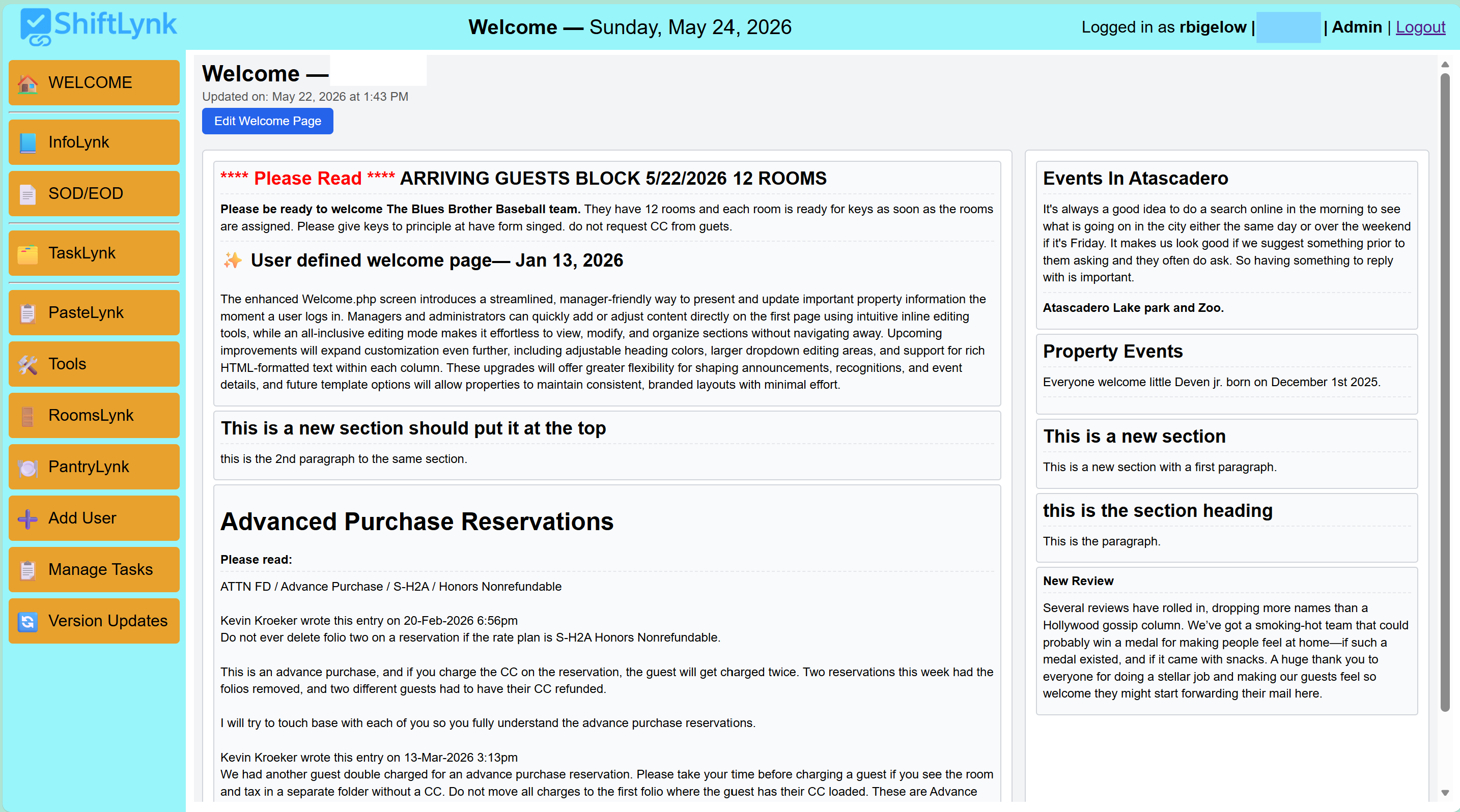
ShiftLynk Welcome page — shift briefings and manager announcements
v 3.4
Latest release — May 2026
100%
Browser-based — no app download
Zero
Paper checklists eliminated
1 Login
Tasks, SOPs, comms & inventory
Our Origin

Built From the Floor Up — By People Who Know Hospitality

ShiftLynk didn't start in a boardroom. It started with a real operational frustration: paper checklists, scattered shift notes, inconsistent handoffs, and staff who didn't always have the information they needed to serve guests confidently.

What began as a simple digital checklist rapidly evolved into a centralized operational hub — the single place every team member opens at the start of their shift to get grounded, informed, and guest-ready. Now on version 3.0, ShiftLynk has grown into a full-featured platform with a proven record across hotels, motels, resorts, and boutique properties.

📋

Digital Shift Checklists

Replaced paper entirely — reducing waste and ensuring every task is tracked and accountable from the first minute of a shift.

📣

Welcoming Team Dashboard

A property-specific first page surfacing current events, updates, and guest review shoutouts — the daily launchpad for every shift.

📖

Integrated Help System & SOPs

Rich HTML instructions, PDF uploads, and external SOP links — accessible from any task with a single click, right on the board.

💬

InfoLynk Communication Layer

Dynamic team messaging with date intelligence, full search, and a scrollable archive — bridging every shift transition seamlessly.

🛍️

Gift Shop Inventory & Multi-Property Support

Pantry/retail inventory management with audit trails and bulk restocking — plus full property isolation for multi-location operators.

TaskLynk

A Two-Column Board That Runs Your Shift

The heart of ShiftLynk is TaskLynk — a real-time two-column board that gives every team member a single, unified view of every task on the shift. One-time and recurring tasks share the same Tasks column, sorted by due time, so associates always see what's coming next — no column-switching, no missed deadlines. Tasks display due times, completion timestamps, and badges automatically — no manual updating required.

🟦

Tasks

All shift tasks sorted by due time

Everything in One View, Sorted by Due Time

One-time tasks and recurring tasks appear together in a single column, ordered by when they're due. Associates always see the full picture of what's next — no jumping between sections.

Past-Due Tasks Turn Red

Any task whose due time has passed turns red automatically — an instant visual alert that draws attention without any action from staff or managers.

Recurring Badge Keeps Context Clear

Recurring tasks display a badge showing their interval and time window — staff know at a glance which tasks repeat and when they close, without any guessing.

Auto Re-Queue After Completion

When a recurring task is completed, the next instance is automatically generated at the correct interval — no manual reset, no missed cycles.

Time-Window Scheduling

Set a Start Time, interval, and End Time per recurring task. Cards appear when the window opens and disappear when it closes — coffee every 15 min from 6–10 AM, then gone. No cleanup required.

One-Click Reminder Creation

Front desk agents can log one-time guest commitment reminders instantly — towel delivery, maintenance visits, special arrivals — added to the sorted task list and logged to shift history.

Defer to Another Shift

Returned tasks can be deferred to AM, MID, PM, or NA with a full audit trail — the destination shift receives the task automatically.

Time-Gap Visibility & Inline Task Creation

The board shows the available time window between consecutive tasks. One click opens Create Task pre-filled for that slot — no time calculations, no leaving the board. Instantly fill idle windows and keep the shift productive.

Task Type Badge on Every Card

Each task displays a color-coded badge — Daily, One Time, Reminder, or Recurring — so every associate knows exactly what they are looking at and how the task will behave before taking any action.

Complete

Done tasks with full history

Due & Done Timestamps

Completed tasks show both the original due time and the actual completion time — making it easy to spot delays, recognize strong performance, and coach where needed.

Every Completion Timestamped

Whether a task is one-time or recurring, every completion is stamped with the exact time — visible in reports and audits for precise operational accountability.

Shift Report — Print, Save as PDF, or Email

Generate a full shift report at any time with a single click. The report captures every task on the board — what it was, when it was due, when it was completed, and the variance between the two. Print it, save it as a PDF, or email it directly to management without leaving the board.

Variance Reporting — Early, On Time, and Past Due

When a variance threshold is set, the report flags every task as completed early, on time, or past due — giving managers a clear, at-a-glance picture of shift performance without having to do any manual math. Patterns across shifts become visible fast.

Shift Status — Open & Close Included On Demand

Before generating the report, checkboxes next to the Print Report button let staff choose whether to include the Shift Status — Open and Shift Status — Close notes. Include both for a full shift narrative, or keep the report task-only — the choice is made at generation time, not baked into settings.

Management Visibility Without System Access

Because the report can be emailed or saved as a PDF, managers and ownership can review shift performance, task compliance, and handoff notes without needing to log in to ShiftLynk — keeping leadership informed on their own schedule.

Return to Tasks

Managers can return a completed task to the Tasks column with a Returned badge — triggering the defer option if the task needs to move to another shift.

Reset Shift — Clean Slate

Reset clears all non-foundational tasks and notes. Foundational tasks return to the Tasks column. Each new shift starts clean — with a confirmation prompt to prevent accidental resets.

See It in Action

Everything the Associate Needs — Right on the Board

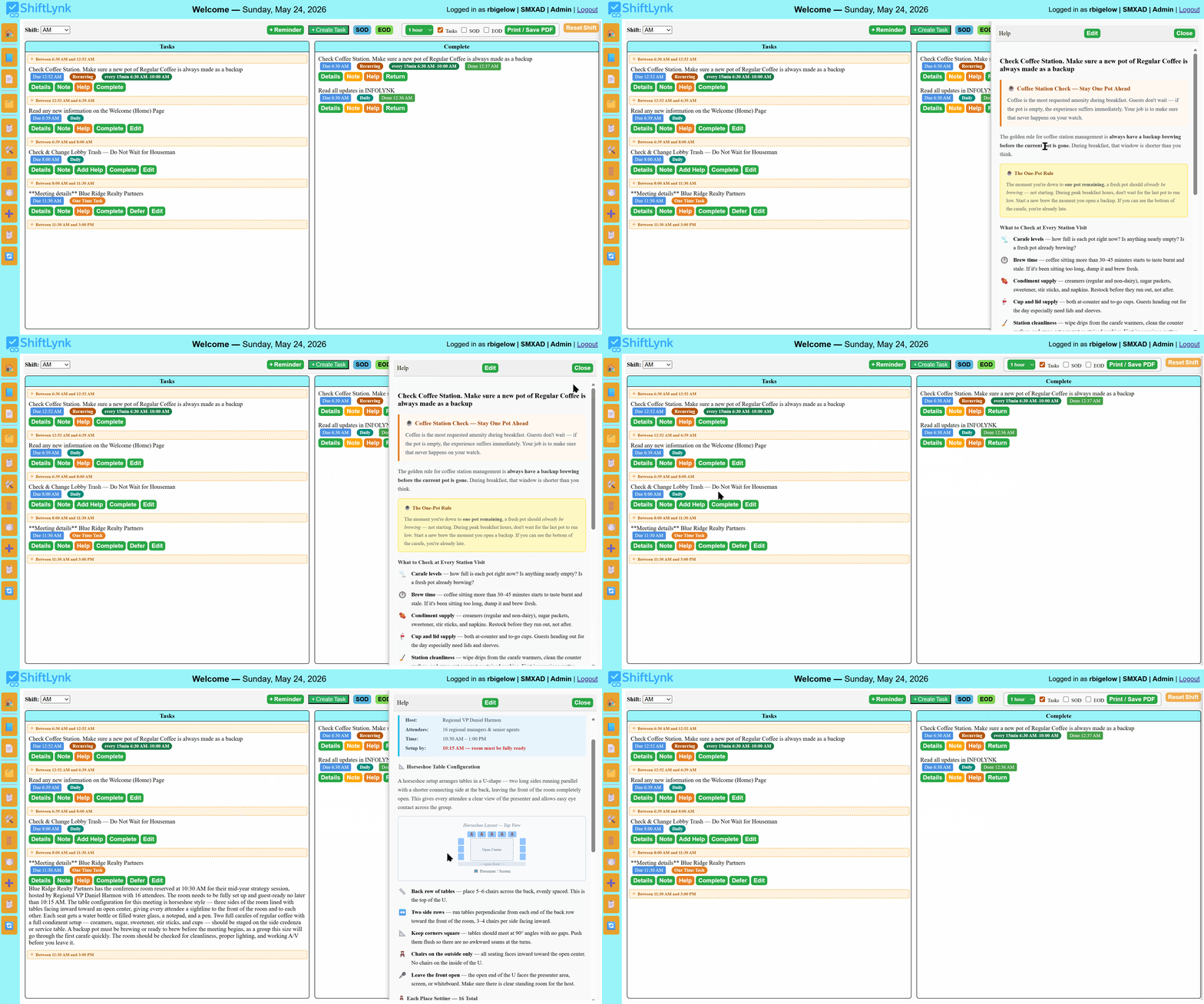
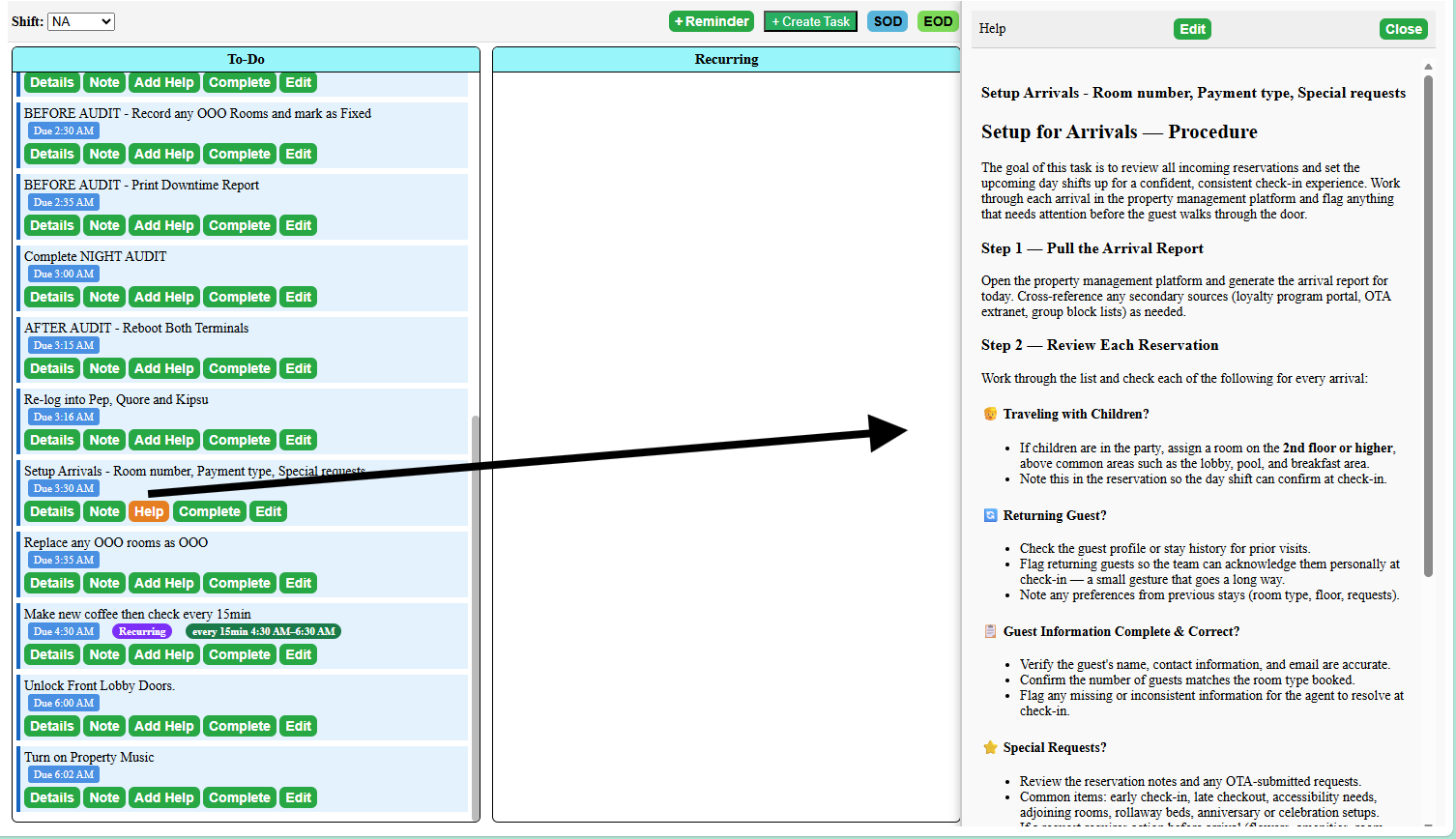
Watch a real ShiftLynk shift board in action. An associate opens task details to review what needs to be done, then clicks the orange Help button — a formatted, step-by-step procedure opens immediately, the associate scrolls through it, and closes it without ever leaving the board. When no SOP has been attached yet, the button reads Add Help instead — a clear signal to managers that the task still needs a procedure. No binders. No searching. No guessing.

1
Associate clicks Details — task description expands instantly below the task card
2
Details closes — associate clicks the orange Help button to open the attached SOP
3
Full formatted procedure scrolls in the Help panel — then closes. Board is untouched.
ShiftLynk task board — associate opens Details then Help panel with formatted SOP
🗂️

Details — Instant Context

One click on Details expands the full task description right below the card — no popup, no new page. The associate reads what needs to be done and gets back to work in seconds.

📙

Orange Help = SOP Attached

When the button reads Help with an orange background, a formatted SOP is ready and waiting. No help file yet? The button reads Add Help instead — a clear signal to managers that the task has no procedure attached. Click Help any time to open the full step-by-step guide without leaving the board.

📋

No Binders. No Searching.

The procedure lives on the task itself. Every associate — new hire or ten-year veteran — has access to the same correct, up-to-date instructions the moment they need them, not five minutes later after digging through a binder.

🛠️

Managers Update. Team Sees It Instantly.

Admins and Managers can edit Help content any time — no developer, no upload, no delay. Update a procedure today and every associate sees the new version the next time they open that task.

Platform Features

Everything Your Team Needs in One Login

No app download. No IT setup. Open a browser on any phone, tablet, or desktop and everything is right there.

🏠

Welcoming Team Dashboard

Every shift opens on a property-specific page with current events, VIP alerts, team-wide announcements, and outstanding service reviews — so staff arrive at their post already informed.

Manager-editable inline

Guest Review Spotlight

Exceptional service reviews display prominently — celebrating team members by name, reinforcing the standard of excellence, and building the morale that drives consistent guest satisfaction.

Positive reinforcement

Interactive Shift Checklists

TaskLynk replaces paper checklists entirely. AM, MID, PM, and NA shifts each have their own board — with role-based task creation restricted to Admins and Managers.

4 shift types supported
📖

SOPs Alongside Every Task

The slide-out Help Panel puts rich HTML instructions, uploaded PDFs, and external reference links one click away from any task — reducing training time and eliminating guesswork on the floor.

PDF + HTML + links
🔔

Guest Reminder Button

Agents create one-time reminders instantly — towel delivery, maintenance visits, special arrivals, follow-ups with in-house guests — complete with titles, descriptions, and due times. All logged to shift history.

Never miss a commitment
📊

Shift Reports — Print & Save PDF

Generate polished, print-ready reports summarizing all shift activity — tasks, completion times, notes, variance, and Shift Status data. Choose what to include with Tasks, SS Open, and SS Close checkboxes before opening the report. A variance threshold filter (Admin/Manager) appends Early and Past Due sections showing which tasks were off-schedule and by how much.

Variance threshold filter
🕐

Recurring Task Time Windows

Assign a Start Time, interval, and End Time to any recurring task. The card appears when the window opens and disappears automatically when it closes — giving staff a clean board at shift's end with no manual cleanup.

Auto start & stop
📋

Shift Status — Open & Close Reporting

Every shift has separate Shift Status — Open and Shift Status — Close count submissions. The blue SS Open and green SS Close buttons open labeled panels so there's never any confusion. The Shift Status Dashboard shows both records side-by-side for every shift.

Per-shift SS Open + SS Close
🚪

RoomsLynk — Live Room Status Board

Track every room's housekeeping status in real time — Clean, Dirty, Occupied, or flagged. Pet accommodations, guest special requests, and per-room notes are logged directly to the room record so nothing slips through a shift handoff. Fully property-scoped and visible across all four shifts.

Pet & request tracking
✏️

Inline Task Editing

Managers and Admins can edit any task directly from the Tasks column — name, description, help link, task type, and recurring schedule — without leaving the shift board. Changes take effect immediately.

Admin & Manager only
📋

PasteLynk — Customizable Check-In Scripts

PasteLynk gives front desk associates instant access to property-specific check-in language. Select add-ons, choose the right copy for the folio type, and paste a perfectly formatted note in seconds. Admins and Managers can edit, delete, or add items directly on the page — changes persist per-property in the browser.

Admin-customizable content
📝

Task Notes — Always Editable

Attach notes to any task from either column — Tasks or Complete. Notes carry forward when a task is completed without duplicating. An unsaved-changes warning prevents accidental data loss when closing the note box mid-edit.

No duplication. No lost notes.
⏱️

Inline Task Creation Between Tasks

The task board now shows the available time between consecutive tasks — and a single click opens Create Task pre-filled for that gap. See idle windows instantly and fill them without leaving the board. Tasks insert directly into the correct due-time position.

Gap-aware scheduling
🏷️

Task Type Badges — Always Visible

Every task now shows a color-coded type badge alongside its due time: Daily, One Time, Reminder, or Recurring. Staff see exactly what kind of task they are handling — no guessing, no Details panel required. Badges are consistent across all board columns including completed and returned tasks.

4 badge types
🔔

Auto-Alert Tasks for Content Changes

When a manager updates the Welcome page or posts to InfoLynk, the active shift board automatically receives a notification task. No update goes unread — the board surfaces the alert the moment it matters, scoped to the active property so other locations see nothing.

Welcome & InfoLynk alerts
🔗

Sequential Ordering — Built-In Procedure Safety

Because completed tasks move to the Completed column the moment they are done, the active Tasks column is always a clean, ordered list of what still needs to happen. Tasks are sorted by due time, so any step that must occur before a critical procedure — like printing a down-time report before running Night Audit — naturally sits above it on the board. Staff work top to bottom with confidence, and nothing that should have come first gets buried or overlooked.

A future update will introduce formal task dependencies — allowing a task to be linked to one or more prerequisites, with a live warning triggered if those steps haven't been completed first. It's the kind of built-in procedural enforcement that a paper checklist simply cannot provide.

Paper lists can't do this
Task Management

The Right Task to the Right Person — In Seconds

ShiftLynk gives every role a fast, context-aware path to task creation. Associates log a guest commitment in one click. Managers schedule a precise one-time event, set up a recurring check, or insert a new task directly into an open window on the board — all without leaving the shift they're already managing.

Ways to Create a Task
🔔

Reminder Button All Staff

One-click slide-down form for immediate guest commitments — towels, wake-up calls, parking validation, follow-ups. No due date required. Appears on the board the moment it's saved.

+ Create Task Manager & Admin

Full form with all four task types. Assign a specific date and time and the task is automatically placed in whichever shift window best matches — no manual shift selection needed. Leave the time open and it lands in the current shift directly.

⏱️

Insert Into a Time Gap Manager & Admin

The board shows the available time between consecutive tasks. A + Add Task Here button opens Create Task pre-filled with a due time that fits the open window — no math, no manual entry.

Task Types
Daily

Foundational tasks that appear every shift. Reset returns them to the Tasks column — they never leave the board permanently.

Manager & Admin
One Time

Date and time specific. Visible only on its scheduled day and cleared automatically after the next shift reset.

Manager & Admin
Reminder

Quick ad-hoc task for in-shift guest needs. Any staff member can create one in moments from the Reminder button.

All Staff
Recurring

Fires on a set interval within a defined start-to-end window, then retires automatically when the window closes.

Manager & Admin
Beginning of Shift

Auto-anchored to the shift start time. When shift times change, every BOS task's due time updates instantly — cash counts, key handoffs, Shift Status — Open reviews.

Manager & Admin
End of Shift

Due 15 minutes before the shift ends. Syncs automatically when shift end times change — drawer balance, report transmission, key handoff to incoming agent.

Manager & Admin
shiftlynk.net/shift_board.php · AM Shift
AM Shift — Sat May 24
jsmith · Front Desk
+ Reminder
+ Create Task
Reset Shift
Create Daily Task
Task Name
Conference Room Setup — Water & Coffee
Due At
05/24/2026  10:30
Auto-assigned Shift
AM ✓
Cancel
Save Task
Tasks
Due 9:00 AM Recurring
Coffee Station Check
↻ every 15 min · 6:00 AM – 10:00 AM
1 hr 30 min available + Add Task Here
Due 10:30 AM One Time
Conference Room Setup — Water & Coffee
Due 12:00 PM Daily
Lobby Trash Check
Complete
Done 7:02 AM Reminder
Extra towels — rm 214
Done 8:15 AM Daily
Read Welcome Page Updates
Shift Transitions

The Handoff That Handles Itself

Every shift change in hospitality follows the same critical checklist: count the cash, verify every key, transmit the report, and pass the baton cleanly to the incoming agent. ShiftLynk automates the structure of that handoff — anchoring the right tasks to exactly the right times so your team always knows what to do, and managers never have to wonder if the transition was handled correctly.

🟢

Beginning of Shift (BOS) — Anchored to Shift Start

BOS tasks appear at the very top of the board and are due at the moment the shift begins. Count the cash, verify key ownership, review the Shift Status — Open notes — all waiting the second the shift opens. When a manager updates the shift start time, every BOS task's due time syncs automatically. No manual editing, no mismatched clock-in times.

🟠

End of Shift (EOS) — 15 Minutes Before the Bell

EOS tasks surface 15 minutes before the shift ends — not at the buzzer, but before it. That gives your agent time to balance the drawer, transmit the shift report, and complete the key handoff with room to breathe. Change the shift end time and every EOS task adjusts its due time automatically, keeping the 15-minute lead intact.

🔑

Cash, Keys & Reports — Nothing Slips Through

The most common audit failures at shift change come from rushed handoffs: an unlogged key, a drawer that was never balanced, a report that wasn't transmitted. BOS and EOS tasks turn those critical moments into a visible, clickable checklist — each completion timestamped and automatically recorded to the shift history. Accountability without paperwork.

😌

The Relief of a Clean Shift Close

For seasoned front desk agents, the EOS checklist is a quiet confidence at the end of a long shift — every item accounted for, every key logged, every report sent. The board confirms it before you clock out. For newer associates, it's the guardrail that makes sure nothing was missed. Either way, the shift ends clean and the handoff is done right.

⚡ Live Automation — Times Sync When Shift Times Change
Shift Start 6:00 AM 6:30 AM All BOS task due times updated
Shift End 3:00 PM 2:30 PM EOS tasks auto-moved to 2:15 PM

Update shift times once through the Start Shift form — every BOS and EOS foundational task on the board syncs immediately. No tracking down individual task records. No stale due times the morning after a schedule change.

shiftlynk.net/shift_board.php · AM Shift
S
ShiftLynk
AM Shift — Sun May 31 jdoe · Front Desk
🕐 6:30 AM – 3:00 PM BOS Due: 6:30 AM EOS Due: 2:45 PM ✓ Times synced
Beginning of Shift
Due 6:30 AM BOS
Count & Verify Cash Drawer
Reconcile with prior shift closing total
Due 6:30 AM BOS
Verify Key Log — Confirm All Keys Received
Due 6:30 AM BOS
Review SS Open Notes & Welcome Page
· · · regular shift tasks · · ·
End of Shift — 15 Min Before Close
Due 2:45 PM EOS
Balance Drawer & Transmit Shift Report
Due 2:45 PM EOS
Key Handoff to Incoming Agent
Due 2:45 PM EOS
Submit Shift Status — Close
Welcome Page

The First Read Every Shift — Before Anything Else

The Welcome page is the first screen every associate sees when they log in. Managers post shift-critical information here — VIP arrivals, policy updates, event holds, and cross-shift handoff notes — and the board reinforces it as a daily task so nothing gets missed during a busy shift change.

📣

Manager-Posted Shift Briefings

VIP arrivals, event holds, policy changes, and handoff notes — posted by leadership, visible to every associate the moment they log in.

🔔

Auto-Alert on Every Update

When the Welcome page is updated, ShiftLynk automatically creates a notification task on the active shift board — so no update goes unread, even on the busiest shift.

🏨

Property-Isolated by Design

Each property manages its own Welcome page independently. Associates only see content relevant to their location — no cross-property noise.

ShiftLynk Welcome page — shift briefings and manager announcements
Featured Module

InfoLynk — Your Team's Living Communication Thread

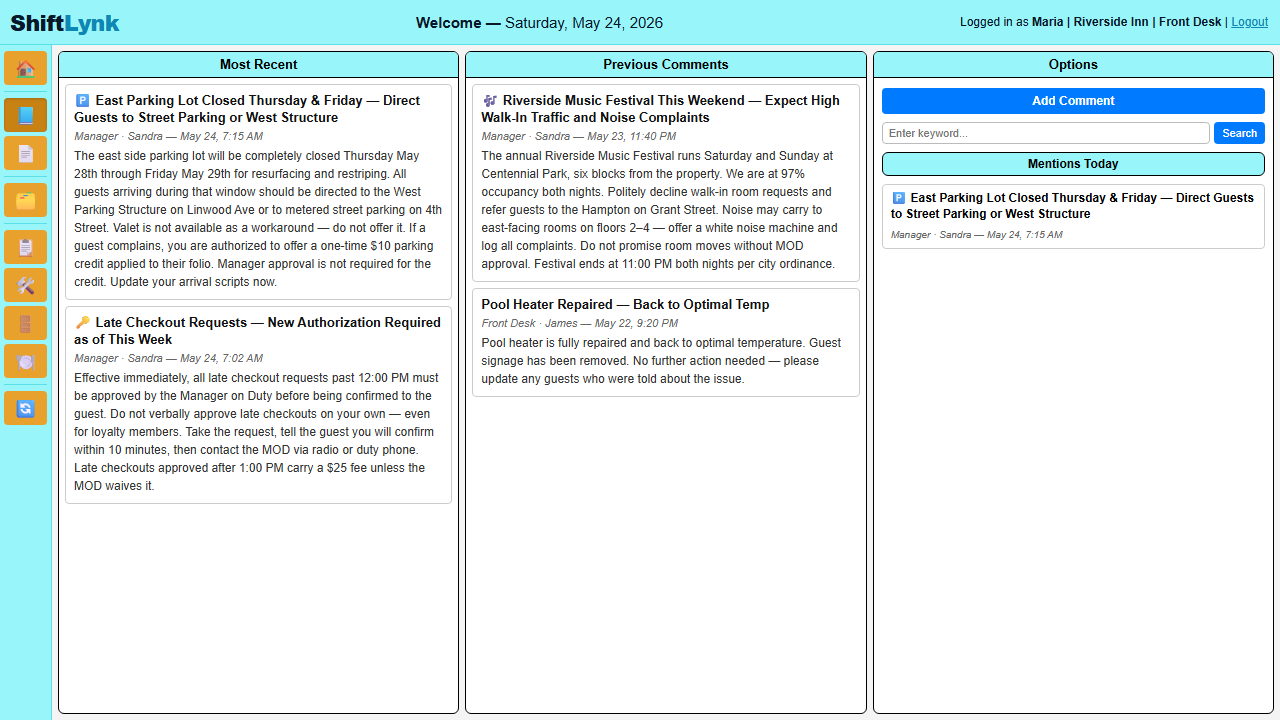
InfoLynk is the dynamic communication layer built into ShiftLynk. Every entry is automatically tagged with the logged-in user's name — no manual attribution. Property isolation ensures staff only ever see notes belonging to their assigned location.

👁️

4 Most Recent Notes Always Visible

The moment you log in, the four latest team notes are front and center — you're caught up before you take your first guest call.

📅

Intelligent Date Search

InfoLynk automatically surfaces any past note containing today's date — ideal for recurring daily tasks and shift-to-shift handoffs that reference specific dates.

🔍

Keyword Search & Scrollable Archive

Search any word or phrase to locate a specific note instantly. The full archive is always a scroll away — nothing is ever lost or overwritten.

🔒

Property-Isolated & Auto-Tagged

Every post, search, and deletion is scoped to the active property. Comments are automatically attributed to the session user — no impersonation, no misattribution.

↩️

Threaded Replies

Any team member can reply directly to a comment. Replies thread under their parent with a blue border, author name, and timestamp — keeping every conversation intact and easy to follow.

📖

Live TaskLynk Integration

When a comment or reply is posted, an InfoLynk task automatically appears in the active shift on the task board — so the desk team stays informed in real time without ever leaving their screen.

📅

Date-Aware Tasks — Notes Become Future Action Items

Any InfoLynk note that mentions a specific date — written today, last week, or last month — automatically creates a task on all four shift boards on that exact date. A note that says "VIP arrival June 14, champagne on arrival" needs no follow-up. On June 14, every shift sees it at the top of their board with the full comment and every reply included in the Details panel. The task is refreshed on every page load, so replies added later in the day are always current.

This is something a paper task list can never do — a commitment written once, honored automatically on exactly the right day, on every shift.

ShiftLynk InfoLynk — team communication board showing manager posts, date matching, and options panel
RoomsLynk

Room Tracking, Pets & Guest Requests — All in One View

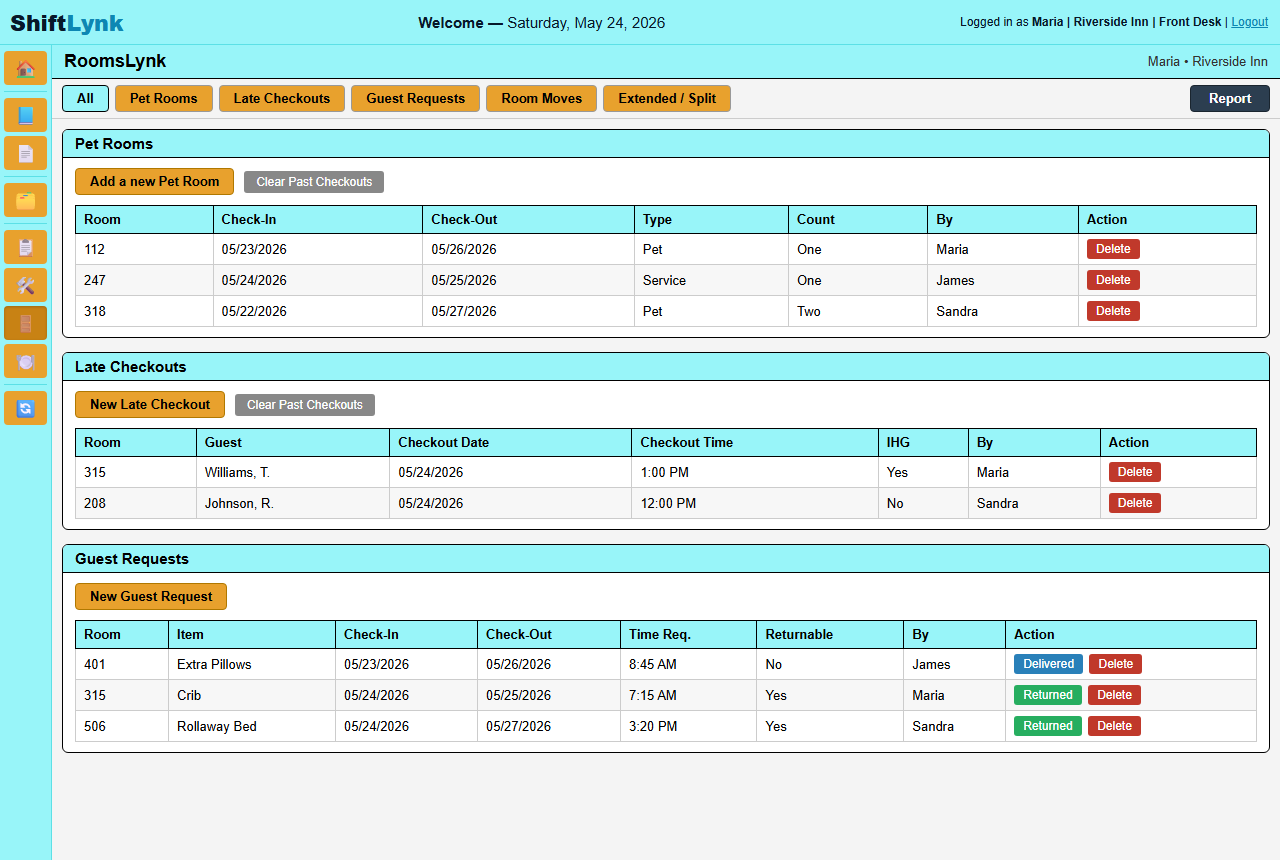
RoomsLynk gives your front desk a live, shift-by-shift view of every room's status — clean, dirty, occupied, or flagged. Pet accommodations, guest special requests, and room notes are logged directly to the room record so nothing slips through a handoff.

🚪

Live Room Status Board

Every room displays its current housekeeping status at a glance — updated by staff in real time so front desk always knows what's ready for a guest.

🐾

Pet & Special Request Tracking

Flag pet-occupied rooms and log guest-specific accommodations directly on the room record — visible across shifts so every team member stays informed.

📝

Per-Room Notes & History

Attach shift notes to any room — maintenance issues, VIP preferences, pending requests — with full timestamped history for accountability and context.

🏨

Property-Scoped & Shift-Aware

Room data is fully isolated to each property and visible across all four shifts — so every team member starts their shift with accurate, current room intelligence.

ShiftLynk RoomsLynk — pet rooms, late checkouts, and guest requests board
See It in Action

Every Guest Detail. Every Room. Every Shift.

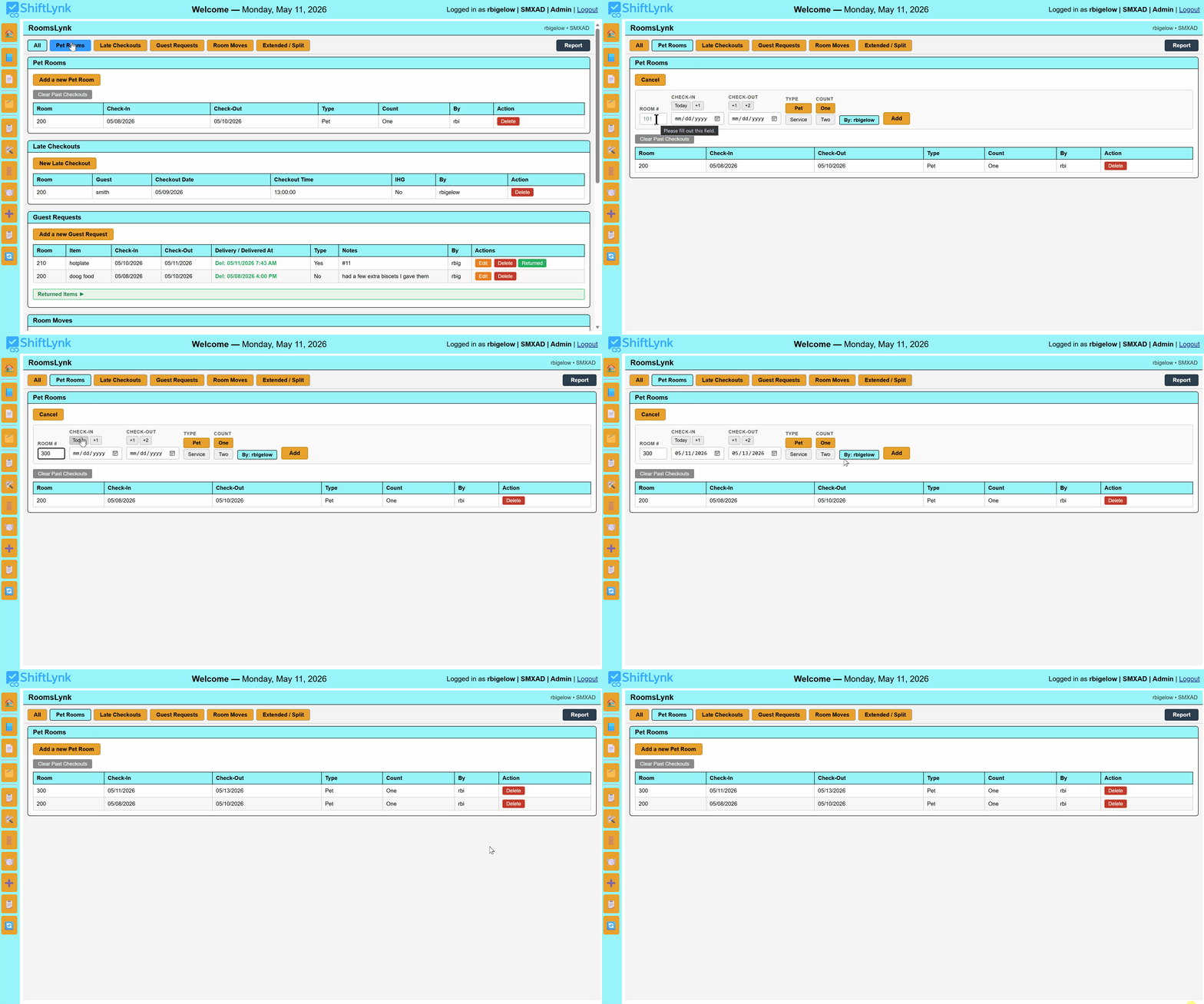
Watch how front desk associates log the details that matter — pets, late checkouts, special requests, and room moves — directly on the room record so every shift inherits accurate, complete information.

RoomsLynk — flagging a room as pet occupied
🐾

Flagging a Pet Room

Mark a room as pet-occupied in seconds. The pet flag appears on the room record immediately — visible to every shift so housekeeping and front desk always know before they knock on that door.

RoomsLynk — adding a late checkout to a room
🕐

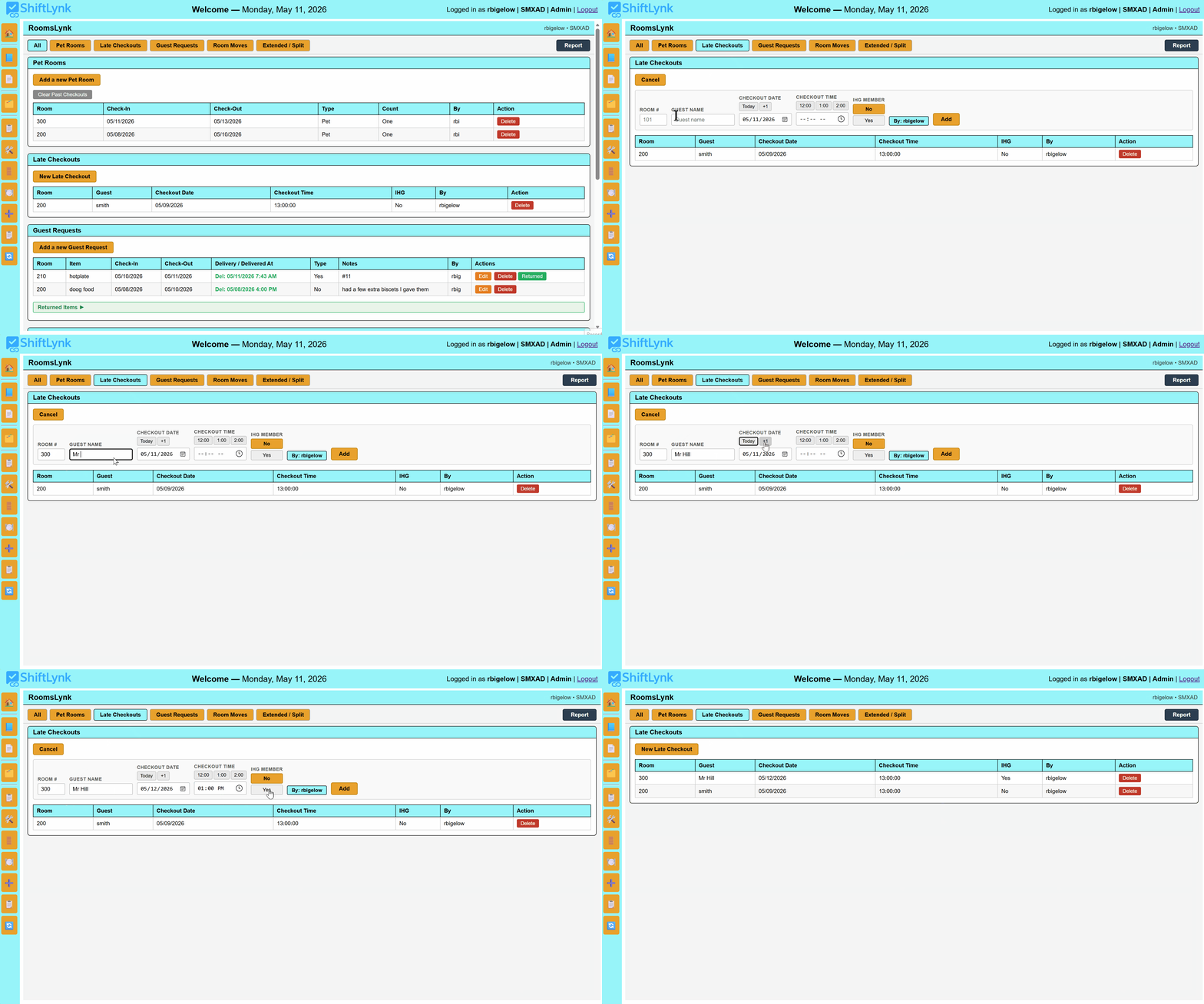
Logging a Late Checkout

Approved a late checkout? Log it directly on the room record with the agreed time. Housekeeping sees it before they schedule the room — no more phone tag, no more confused associates, no more inconvenienced guests.

RoomsLynk — logging a guest special request

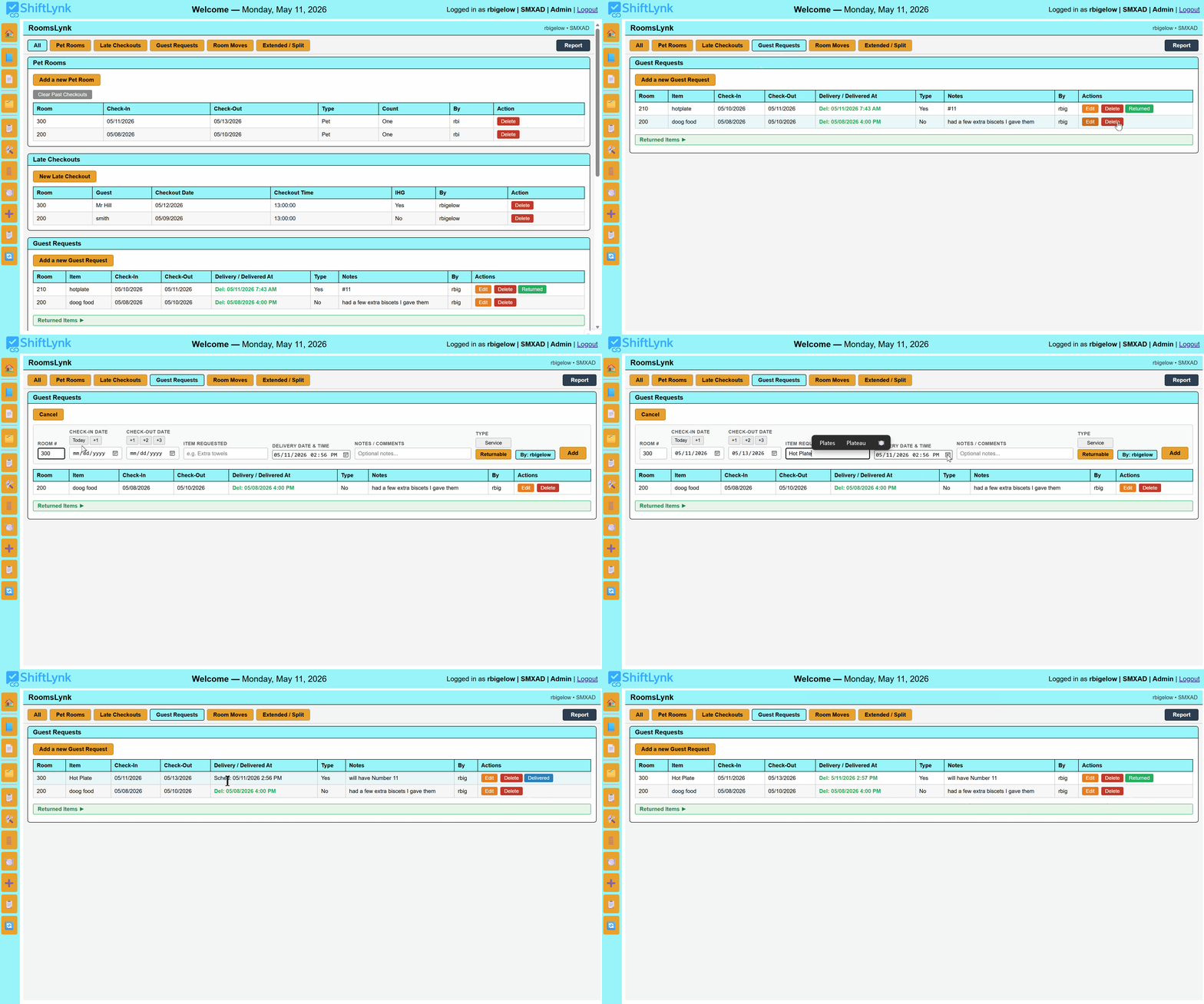
Recording a Guest Request

Extra pillows, a rollaway bed, an allergy note — log any special request directly on the room. Every associate who opens that room record on any shift sees the request without anyone having to repeat themselves.

RoomsLynk — moving a guest to a different room
🔄

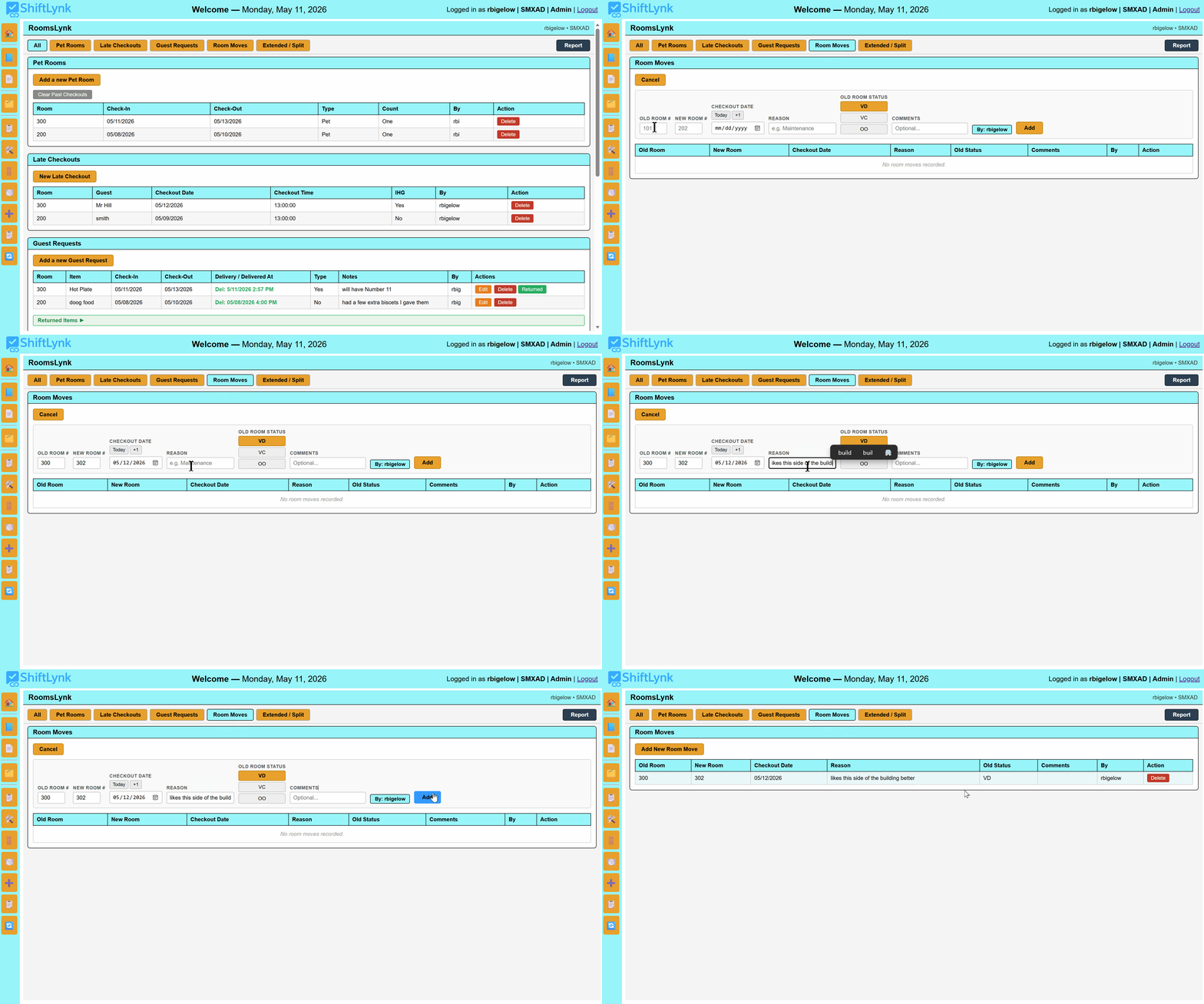
Moving a Guest to a New Room

Maintenance issue, guest preference, or an upgrade — room moves happen. RoomsLynk lets you reassign the room record so the new room carries the guest's details and the vacated room is flagged for housekeeping. Nothing falls through the handoff.

RoomsLynk — linking a back-to-back stayover reservation
🔗

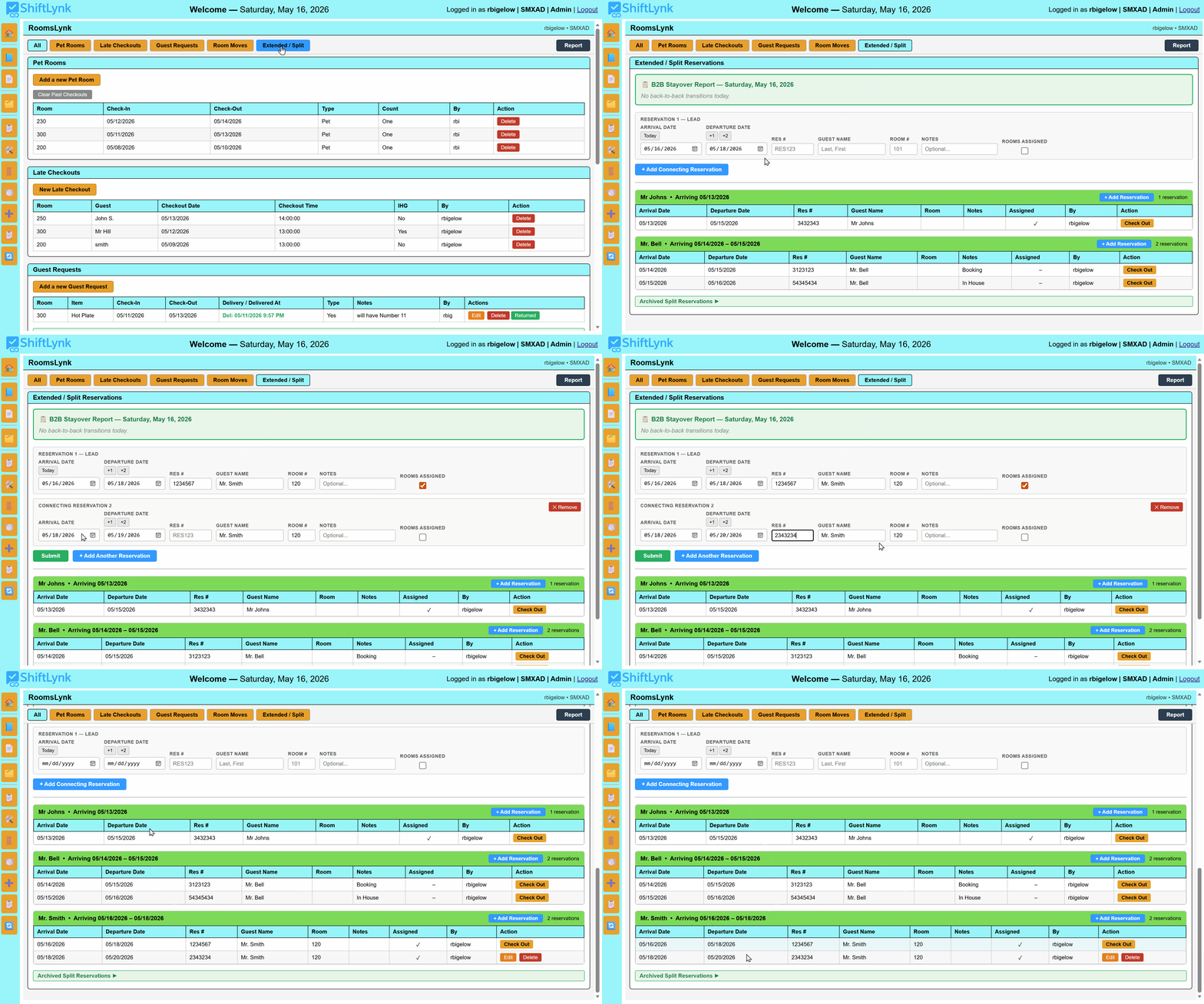
Linking a Back-to-Back Reservation

When a guest books through one channel and extends through another, the result is two separate reservations under the same name — and housekeeping flagging the room for departure when the guest isn't going anywhere. RoomsLynk lets front desk link those reservations so the room is marked as a stayover, not a Do-Out. No missed connections. No displaced guest. No housekeeping confusion.

Integrated Help System

SOPs and Training — Right Where the Work Happens

ShiftLynk's slide-out Help Panel puts every SOP, procedure, and reference document one click away from any task on the board. When a question arises mid-shift, staff don't leave the platform — they click Help and the answer is right there.

Managers and Admins can update help content in real time with no page reload — HTML instructions, uploaded PDF guides, and external links can all be attached to any individual task.

📘

Rich HTML Help Content

Format step-by-step instructions, checklists, and policy notes directly in the platform — no separate document needed.

📄

PDF SOP Uploads

Attach your existing SOP documents, diagrams, or reference sheets to any task — viewable instantly without leaving the board.

🔗

External Links

Connect tasks to online resources, property manuals, or training videos — everything your team needs in one click.

🛠️

Role-Based Editing

Only Admins and Managers can modify help content — staff see the instructions, leadership controls what they say.

ShiftLynk Help System — task card with SOP panel open
Enterprise-Grade Security

Built Secure from the Ground Up

ShiftLynk v2.8 introduced a zero-data-bleed guarantee — every action is property-scoped, every credential is hashed, every operation is auditable.

🏨

Full Property Isolation

Every database write — tasks, notes, completions, defers, resets — includes a property constraint. Actions at one location are physically incapable of affecting another property on the same account.

👤

Role-Based Access

Admin, Manager, and Staff roles each have clearly defined permissions. New user creation is restricted to Admin sessions only — preventing unauthorized account creation across all properties.

🔐

Hashed Password Storage

All passwords are stored using industry-standard hashing algorithms. Credentials are non-reversible — even in the event of unauthorized access, passwords cannot be exposed.

📋

Complete Audit Trails

Every task completion, deferral, return, and note is logged with property, user, and timestamp. Shift reports capture the full operational record for coaching, compliance, and accountability.

Atomic Database Transactions

All delete and update operations are wrapped in MySQL transactions with automatic rollback on error — ensuring no partial writes ever corrupt your shift data.

🔄

Safe Reset Shift

Reset Shift now posts the active shift explicitly via a hidden form field — eliminating the race condition where the wrong shift could accidentally be cleared. A confirmation prompt prevents accidental resets.

PantryLynk

Retail Visibility — Built Right Into ShiftLynk

No separate system needed. ShiftLynk's inventory module gives gift shops and pantry operations the tools to track stock, manage restocking, and flag discrepancies — all within the same platform your team already uses every shift.

Real-time stock level tracking across all frequently sold items — flag low inventory before it becomes a guest-facing problem.

Bulk restocking workflow — stage multiple restocking entries, verify them, then submit in one action. A complete restocking history is maintained automatically.

Daily audit reporting — filter by date and staff initials, toggle between latest-per-day and all-audit views, and expand entries to see previous vs. updated counts with differences highlighted.

Divergence detection — the audit report flags items where actual counts differ from expected quantities, surfacing potential errors or loss for management review.

Timestamp traceability — every audit entry shows who submitted it, when, and what changed — making accountability effortless.

Gift Shop Inventory — Daily Audit Live
ItemExpectedActualStatus
Sunscreen SPF 502422OK
Water Bottle 32oz186Low
Resort Tote Bag1212OK
Snack Mix Assorted309Restock
Local Honey Jar87OK
Postcard Set4015Low
Shift Reports & Accountability

Management Visibility — Every Shift, Every Day

ShiftLynk generates polished, complete shift reports that give leadership the operational picture they need — printed, emailed, or archived.

🖨️

Print-Ready PDF Reports

Generate a complete, well-formed summary of all shift activity — tasks completed, deferred, and returned — with timestamps and notes. Print or save directly from the browser.

⏱️

Variance Threshold Reporting

Set a time threshold before generating the report. An Early section and a Past Due section are appended automatically, listing only tasks that exceeded the threshold — sorted from smallest variance to largest. Default is 1 hour; Admins and Managers can adjust.

📅

Auto-Snapshot on Reset

Coming in the next release: an automatic shift report snapshot is archived at the moment of Reset Shift — creating a permanent, date-stamped record of every shift without any manual action.

Who It's For

Built for the Teams That Make Guests Feel Welcome

ShiftLynk is purpose-built for the departments that interact most directly with guests — enhancing your existing tools without replacing them.

🛎️

Front Desk & Guest Services

Start every shift informed. Know which guests have special requests, celebrate outstanding reviews, create instant reminders for guest commitments, and access any SOP without leaving the board.

🛏️

Housekeeping

Digital room checklists replace paper logs. Post status changes and flag issues through InfoLynk — keeping all departments in sync with zero phone tag and no missed handoffs.

🛍️

Gift Shop & Retail

Track inventory levels, flag low-stock items, and run daily audit reports — all from the same platform your whole team already uses. Restocking, divergence detection, and history included.

📊

General Managers & Leadership

Gain full oversight without being in every conversation. Shift reports, InfoLynk logs, audit trails, and role-based permissions give you the visibility to coach staff and run a tighter operation.

Core Pillars

Seven Principles Behind ShiftLynk

The framework that drives better teams, better service, and better guest experiences — consistently, every shift.

01

Automated Communication

Updates reach every team member the moment they log in — no chasing, no repeating.

02

Streamlined Procedures

Digital checklists and SOPs make every task clear, trackable, and consistent.

03

Enhanced Team Collaboration

InfoLynk connects every department in real time — no silos, no missed handoffs.

04

Centralized Information

One login for everything — tasks, SOPs, updates, inventory, and team notes.

05

Interactive Tools

Searchable archives, date intelligence, live inventory, and printable reports — tools that actively work for your team.

06

Cost Reduction Focus

Zero paper, fewer errors, no miscommunications — ShiftLynk pays for itself fast.

07

Consistency Across Every Shift

Every employee follows the same procedures — every department, every shift — so guests experience the same exceptional service regardless of who is working that day.

Pricing

Simple, Honest Pricing

ShiftLynk has been developed and refined in active hotel environments for years. We're now opening the platform to additional properties — and we want to make that first step as easy as possible.

★  Introductory Offer — Pricing is subject to change as the platform continues to grow

Monthly
$79
per property  /  per month
  • Full TaskLynk shift board
  • InfoLynk team communications
  • RoomsLynk housekeeping board
  • Shift reports & PDF export
  • Shift Status reporting
  • Unlimited team members
  • All future updates included
Start Free 30-Day Trial
BEST VALUE
Annual
$69
per property  /  per month
Billed $828/yr — save $120
  • Everything in Monthly
  • Priority support
  • Early access to new features
  • Lock in your introductory rate for a full year
Start Free 30-Day Trial

Both plans begin with a full 30-day free trial — no credit card required.
At the end of your trial, simply choose the plan that works best for your property.

Managing multiple properties?  Contact us  for multi-property pricing.

✦  This is an introductory offer. Rates are subject to change as new features are added and the platform grows. Existing subscribers will always receive advance notice before any pricing changes take effect. Billing and payment details will be provided upon completion of your free trial.

ShiftLynk v3.7 — Released June 1, 2026 · Date-Aware InfoLynk Tasks, BOS/EOS Pinned Tasks & Shift Status Reporting: InfoLynk notes that mention a future date now automatically create a task on all four shift boards on that exact date — full comment and replies included, refreshed on every load. Beginning of Shift and End of Shift task types pin permanently to the top and bottom of every board. SOD/EOD reporting renamed to Shift Status — Open & Close. RoomsLynk Guest Request report now includes notes and staff delivery tracking. · Previous release (v3.6, May 25, 2026): InfoLynk Reply Threading, Live Task Integration & Full-Thread Search.

Experience the Platform Yourself

Explore ShiftLynk at our live demo site. Request the access password and see the full platform in action — no commitment, no credit card required.

Request Your Access & Password →