Now Live — Version 3.13

Run Every Shift
Like Your Best Shift.

ShiftLynk keeps hospitality teams aligned, accountable, and paperless — one shift at a time. Built for the managers who set the standard and the associates who meet it, ShiftLynk replaces paper checklists, shift guesswork, and missed handoffs with a single platform that keeps every property running the way it should.

https://www.shiftlynk.net/welcome.php
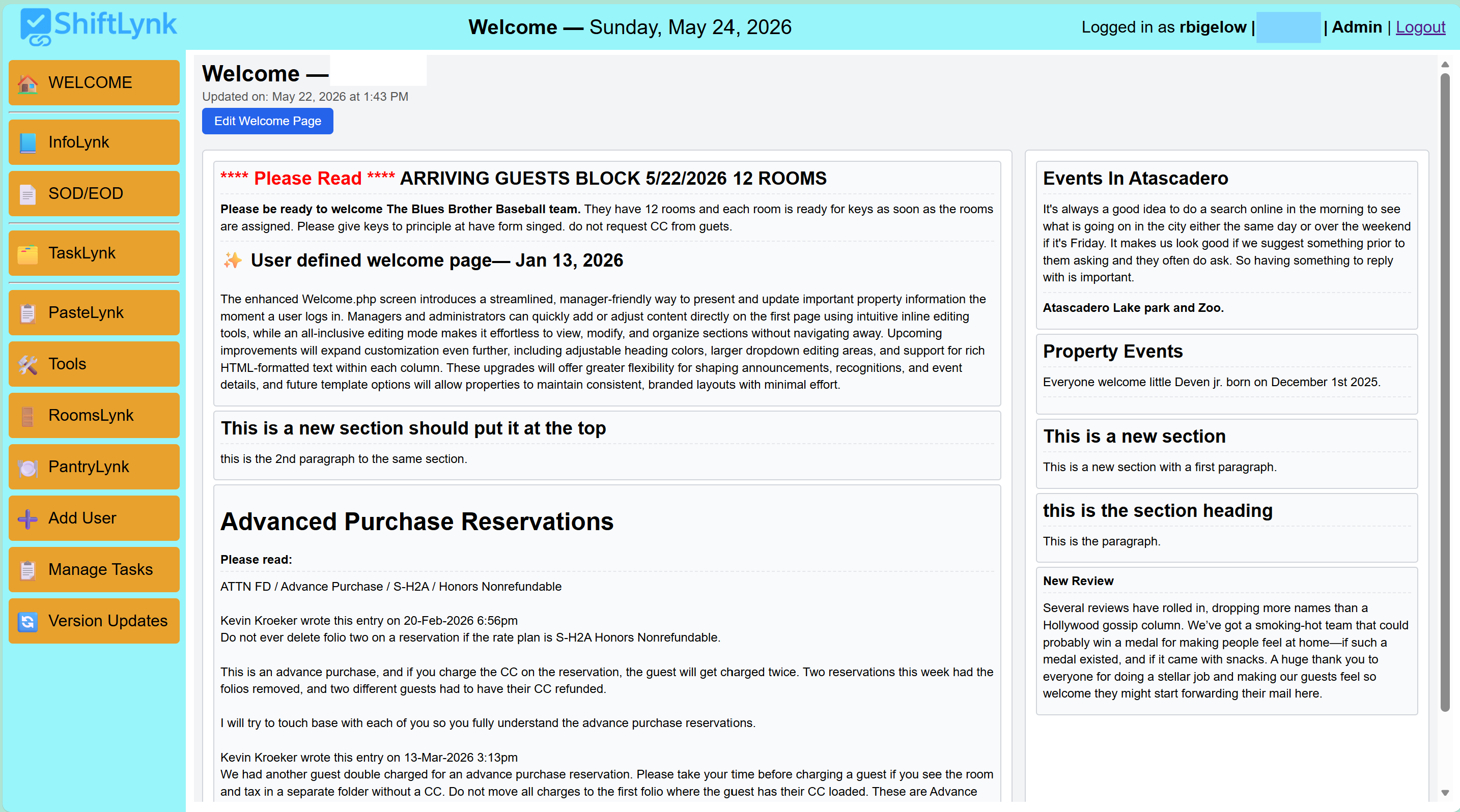
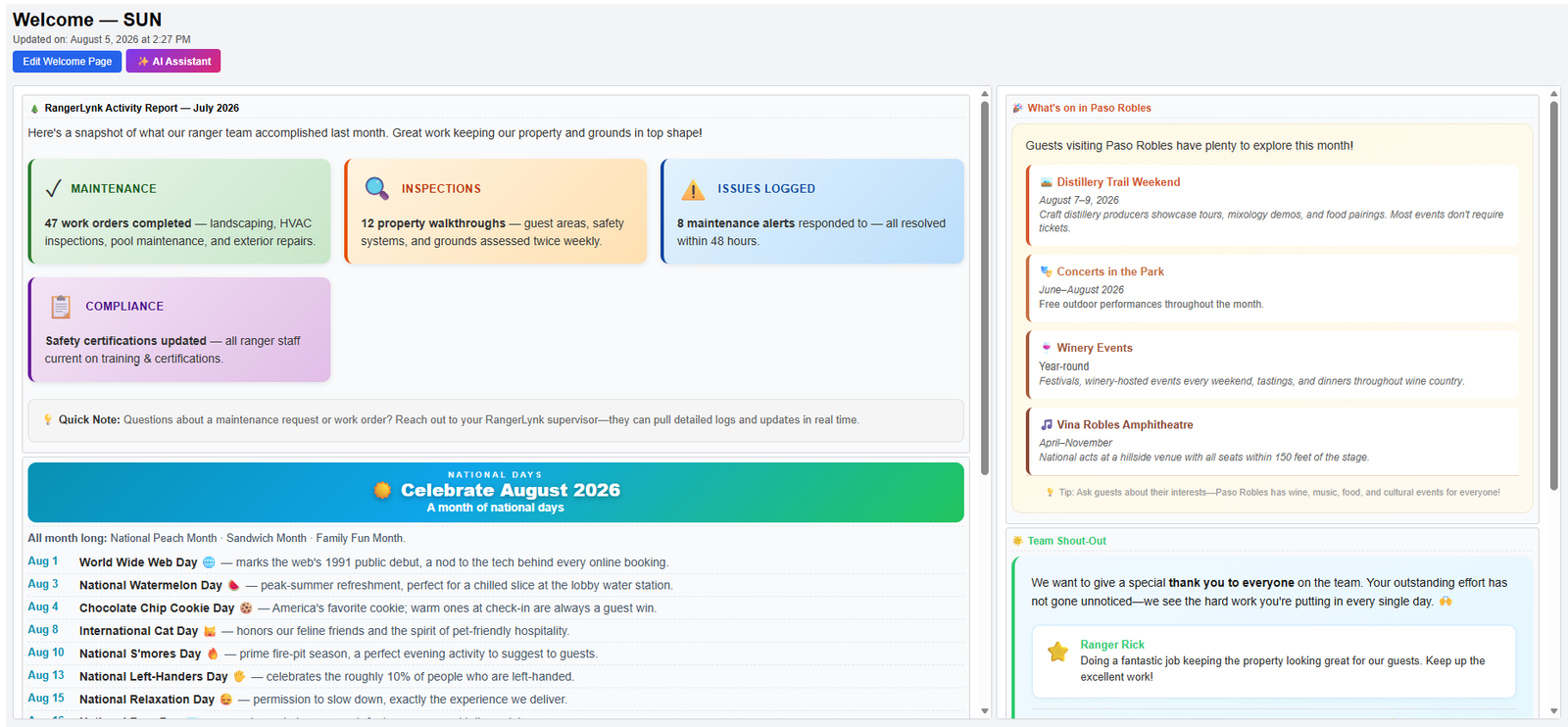
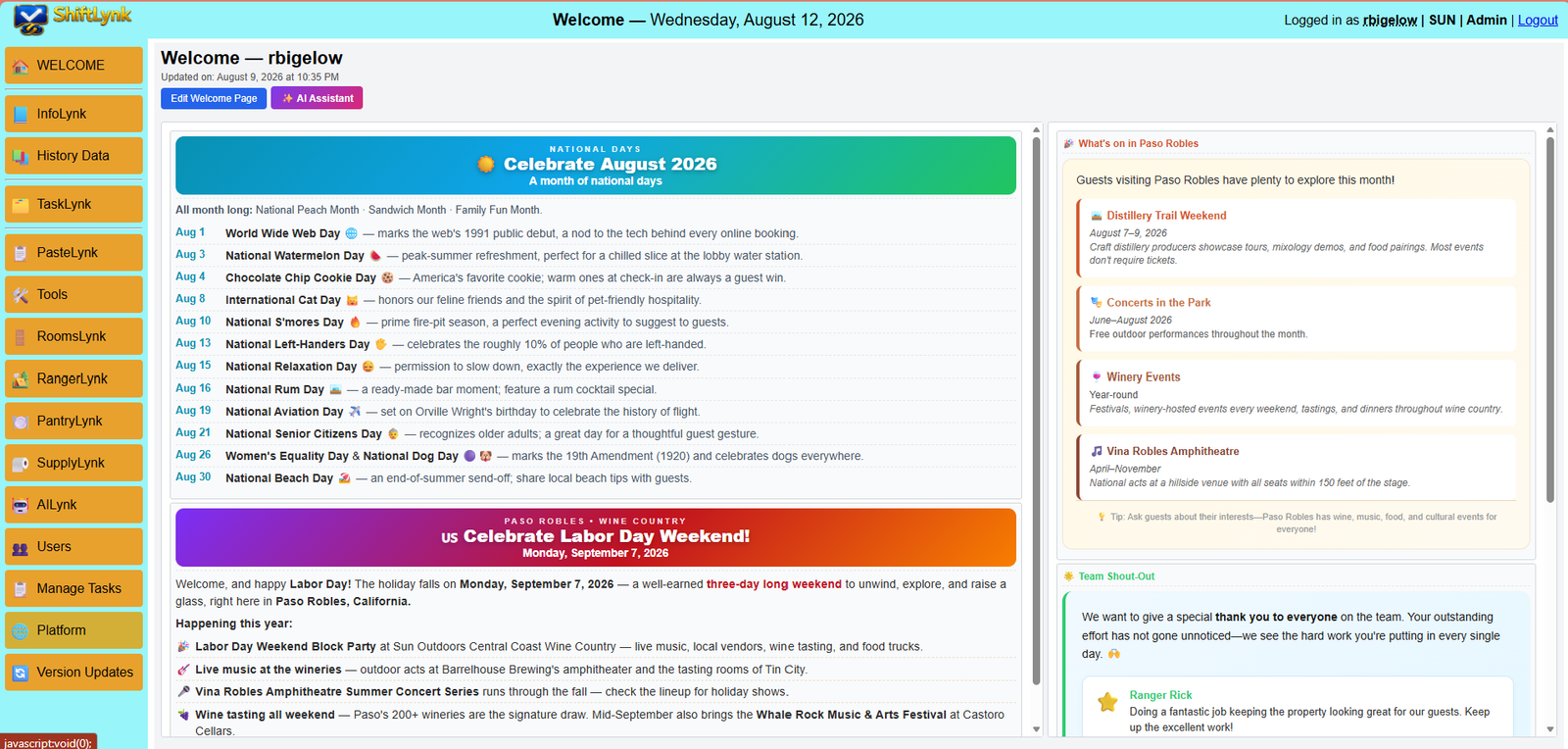
ShiftLynk Welcome page — shift briefings and manager announcements
v 3.16
Latest release — July 2026
100%
Browser-based — no app download
Zero
Paper checklists eliminated
1 Login
Tasks, SOPs, comms & inventory
Our Origin

Built From the Floor Up — By People Who Know Hospitality

ShiftLynk didn't start in a boardroom. It started with a real operational frustration: paper checklists, scattered shift notes, inconsistent handoffs, and staff who didn't always have the information they needed to serve guests confidently.

What began as a simple digital checklist rapidly evolved into a centralized operational hub — the single place every team member opens at the start of their shift to get grounded, informed, and guest-ready. Now on version 3.0, ShiftLynk has grown into a full-featured platform with a proven record across hotels, motels, resorts, and boutique properties.

📋

Digital Shift Checklists

Replaced paper entirely — reducing waste and ensuring every task is tracked and accountable from the first minute of a shift.

📣

Welcoming Team Dashboard

A property-specific first page surfacing current events, updates, and guest review shoutouts — the daily launchpad for every shift.

📖

Integrated Help System & SOPs

Rich HTML instructions, PDF uploads, and external SOP links — accessible from any task with a single click, right on the board.

💬

InfoLynk Communication Layer

Dynamic team messaging with date intelligence, full search, and a scrollable archive — bridging every shift transition seamlessly.

🛍️

Gift Shop Inventory & Multi-Property Support

Pantry/retail inventory management with audit trails and bulk restocking — plus full property isolation for multi-location operators.

🛏️

RoomsLynk Housekeeping Board

Live room status, pet and special-request tracking, and per-room notes — giving housekeeping and front desk a shared, real-time view of every room across every shift.
TaskLynk

A Two-Column Board That Runs Your Shift

The heart of ShiftLynk is TaskLynk — a real-time two-column board that gives every team member a single, unified view of every task on the shift. One-time and recurring tasks share the same Tasks column, sorted by due time, so associates always see what's coming next — no column-switching, no missed deadlines. Tasks display due times, completion timestamps, and badges automatically — no manual updating required.

🟦

Tasks

All shift tasks sorted by due time

Everything in One View, Sorted by Due Time

One-time tasks and recurring tasks appear together in a single column, ordered by when they're due. Associates always see the full picture of what's next — no jumping between sections.

Past-Due Tasks Turn Red

Any task whose due time has passed turns red automatically — an instant visual alert that draws attention without any action from staff or managers.

Recurring Badge Keeps Context Clear

Recurring tasks display a badge showing their interval and time window — staff know at a glance which tasks repeat and when they close, without any guessing.

Auto Re-Queue After Completion

When a recurring task is completed, the next instance is automatically generated at the correct interval — no manual reset, no missed cycles.

Time-Window Scheduling

Set a Start Time, interval, and End Time per recurring task. Cards appear when the window opens and disappear when it closes — coffee every 15 min from 6–10 AM, then gone. No cleanup required.

One-Click Reminder Creation

Front desk agents can log one-time guest commitment reminders instantly — towel delivery, maintenance visits, special arrivals — added to the sorted task list and logged to shift history.

Defer to Another Shift

Returned tasks can be deferred to AM, MID, PM, or NA with a full audit trail — the destination shift receives the task automatically.

Time-Gap Visibility & Inline Task Creation

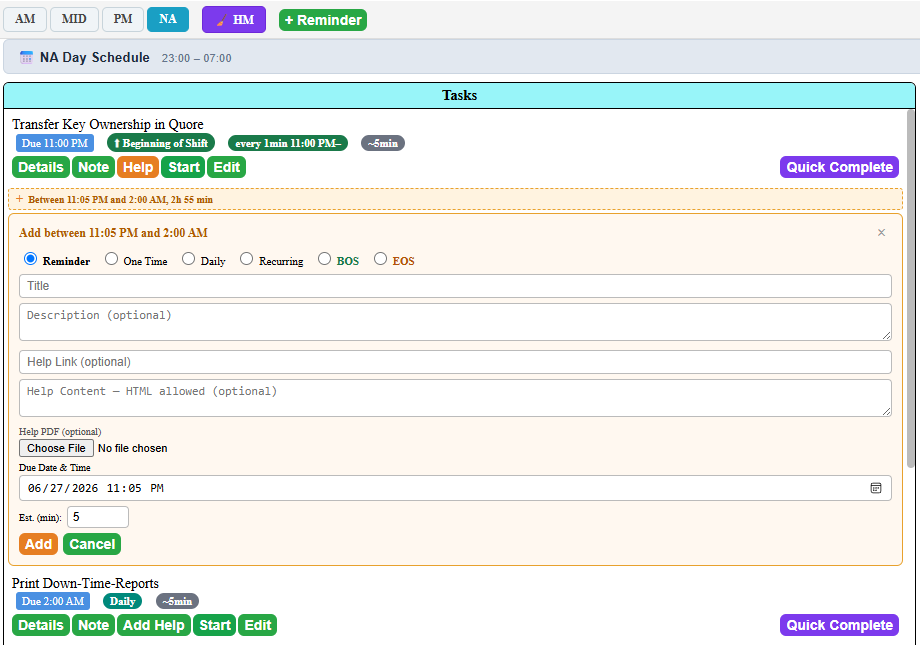
The board shows the available time window between consecutive tasks. One click opens Create Task pre-filled for that slot — no time calculations, no leaving the board. Instantly fill idle windows and keep the shift productive.

Task Type Badge on Every Card

Each task displays a color-coded badge — Daily, One Time, Reminder, or Recurring — so every associate knows exactly what they are looking at and how the task will behave before taking any action.

Complete

Done tasks with full history

Due & Done Timestamps

Completed tasks show both the original due time and the actual completion time — making it easy to spot delays, recognize strong performance, and coach where needed.

Every Completion Timestamped

Whether a task is one-time or recurring, every completion is stamped with the exact time — visible in reports and audits for precise operational accountability.

Shift Report — Print, Save as PDF, or Email

Generate a full shift report at any time with a single click. The report captures every task on the board — what it was, when it was due, when it was completed, and the variance between the two. Print it, save it as a PDF, or email it directly to management without leaving the board.

Variance Reporting — Early, On Time, and Past Due

When a variance threshold is set, the report flags every task as completed early, on time, or past due — giving managers a clear, at-a-glance picture of shift performance without having to do any manual math. Patterns across shifts become visible fast.

Shift Status — Open & Close Included On Demand

Before generating the report, checkboxes next to the Print Report button let staff choose whether to include the Shift Status — Open and Shift Status — Close notes. Include both for a full shift narrative, or keep the report task-only — the choice is made at generation time, not baked into settings.

Management Visibility Without System Access

Because the report can be emailed or saved as a PDF, managers and ownership can review shift performance, task compliance, and handoff notes without needing to log in to ShiftLynk — keeping leadership informed on their own schedule.

Return to Tasks

Managers can return a completed task to the Tasks column with a Returned badge — triggering the defer option if the task needs to move to another shift.

Reset Shift — Clean Slate

Reset clears all non-foundational tasks and notes. Foundational tasks return to the Tasks column. Each new shift starts clean — with a confirmation prompt to prevent accidental resets.

See It in Action

Everything the Associate Needs — Right on the Board

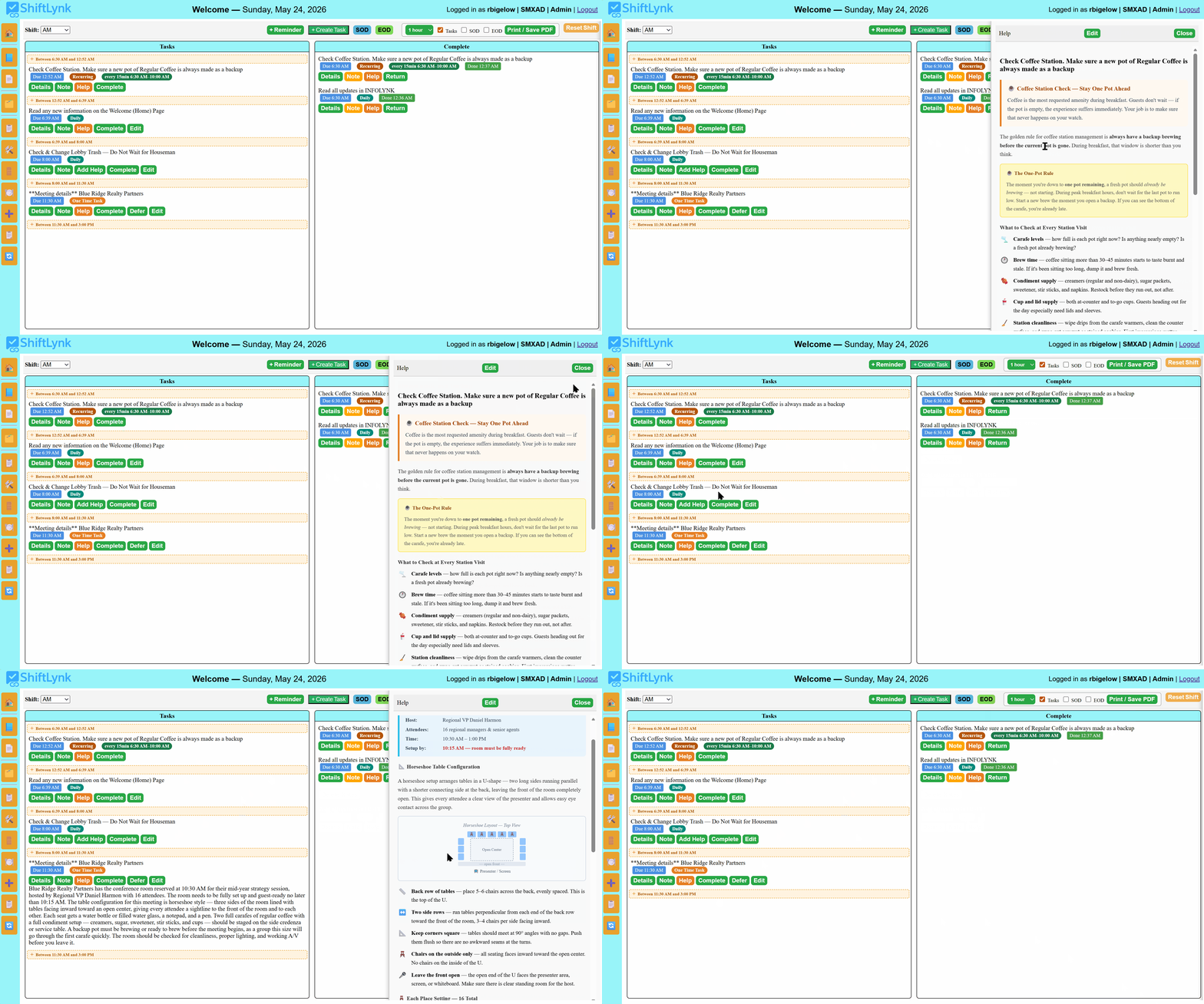
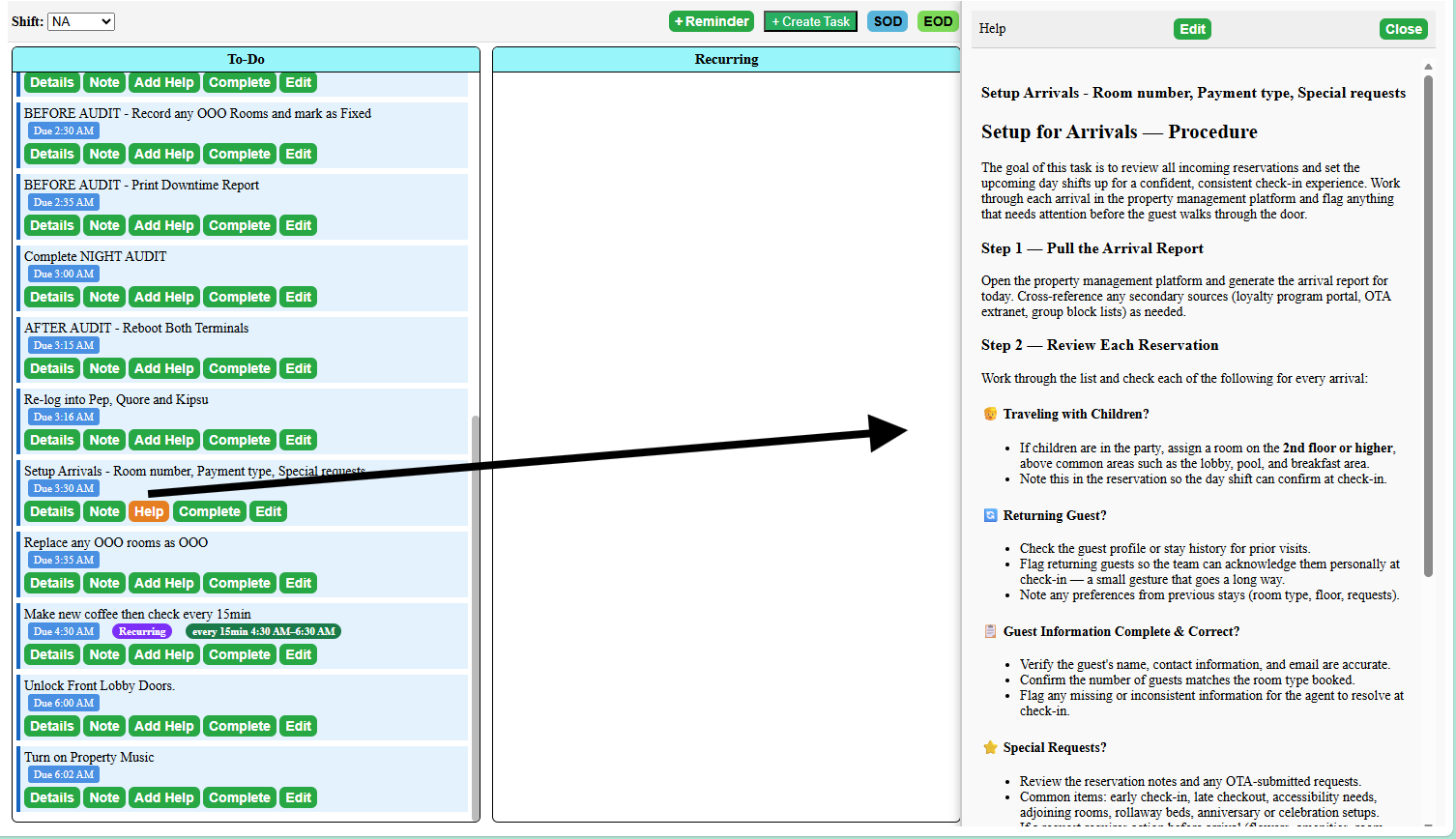
Watch a real ShiftLynk shift board in action. An associate opens task details to review what needs to be done, then clicks the orange Help button — a formatted, step-by-step procedure opens immediately, the associate scrolls through it, and closes it without ever leaving the board. When no SOP has been attached yet, the button reads Add Help instead — a clear signal to managers that the task still needs a procedure. No binders. No searching. No guessing.

1
Associate clicks Details — task description expands instantly below the task card
2
Details closes — associate clicks the orange Help button to open the attached SOP
3
Full formatted procedure scrolls in the Help panel — then closes. Board is untouched.
ShiftLynk task board — associate opens Details then Help panel with formatted SOP
🗂️

Details — Instant Context

One click on Details expands the full task description right below the card — no popup, no new page. The associate reads what needs to be done and gets back to work in seconds.

📙

Orange Help = SOP Attached

When the button reads Help with an orange background, a formatted SOP is ready and waiting. No help file yet? The button reads Add Help instead — a clear signal to managers that the task has no procedure attached. Click Help any time to open the full step-by-step guide without leaving the board.

📋

No Binders. No Searching.

The procedure lives on the task itself. Every associate — new hire or ten-year veteran — has access to the same correct, up-to-date instructions the moment they need them, not five minutes later after digging through a binder.

🛠️

Managers Update. Team Sees It Instantly.

Admins and Managers can edit Help content any time — no developer, no upload, no delay. Update a procedure today and every associate sees the new version the next time they open that task.

Platform Features

Everything Your Team Needs in One Login

No app download. No IT setup. Open a browser on any phone, tablet, or desktop and everything is right there.

🏠

Welcoming Team Dashboard

Every shift opens on a property-specific page with current events, VIP alerts, team-wide announcements, and outstanding service reviews — so staff arrive at their post already informed.

Manager-editable inline

Guest Review Spotlight

Exceptional service reviews display prominently — celebrating team members by name, reinforcing the standard of excellence, and building the morale that drives consistent guest satisfaction.

Positive reinforcement

Interactive Shift Checklists

TaskLynk replaces paper checklists entirely. AM, MID, PM, and NA shifts each have their own board — with role-based task creation restricted to Admins and Managers.

4 shift types supported
📖

SOPs Alongside Every Task

The slide-out Help Panel puts rich HTML instructions, uploaded PDFs, and external reference links one click away from any task — reducing training time and eliminating guesswork on the floor.

PDF + HTML + links
🔔

Guest Reminder Button

Agents create one-time reminders instantly — towel delivery, maintenance visits, special arrivals, follow-ups with in-house guests — complete with titles, descriptions, and due times. All logged to shift history.

Never miss a commitment
📊

Shift Reports — Print & Save PDF

Generate polished, print-ready reports summarizing all shift activity — tasks, completion times, notes, variance, and Shift Status data. Choose what to include with Tasks, SS Open, and SS Close checkboxes before opening the report. A variance threshold filter (Admin/Manager) appends Early and Past Due sections showing which tasks were off-schedule and by how much.

Variance threshold filter
🕐

Recurring Task Time Windows

Assign a Start Time, interval, and End Time to any recurring task. The card appears when the window opens and disappears automatically when it closes — giving staff a clean board at shift's end with no manual cleanup.

Auto start & stop
📋

Shift Status — Open & Close Reporting

Every shift has separate Shift Status — Open and Shift Status — Close count submissions. The blue SS Open and green SS Close buttons open labeled panels so there's never any confusion. The Shift Status Dashboard shows both records side-by-side for every shift.
Per-shift SS Open + SS Close
🚪

RoomsLynk — Live Room Status Board

Track every room's housekeeping status in real time — Clean, Dirty, Occupied, or flagged. Pet accommodations, guest special requests, and per-room notes are logged directly to the room record so nothing slips through a shift handoff. Fully property-scoped and visible across all four shifts.

Pet & request tracking
✏️

Inline Task Editing

Managers and Admins can edit any task directly from the Tasks column — name, description, help link, task type, and recurring schedule — without leaving the shift board. Changes take effect immediately.

Admin & Manager only
📋

PasteLynk — Customizable Check-In Scripts

PasteLynk gives front desk associates instant access to property-specific check-in language. Select add-ons, choose the right copy for the folio type, and paste a perfectly formatted note in seconds. Admins and Managers can edit, delete, or add items directly on the page — changes persist per-property in the browser.

Admin-customizable content
📝

Task Notes — Always Editable

Attach notes to any task from either column — Tasks or Complete. Notes carry forward when a task is completed without duplicating. An unsaved-changes warning prevents accidental data loss when closing the note box mid-edit.

No duplication. No lost notes.
⏱️

Inline Task Creation Between Tasks

The task board now shows the available time between consecutive tasks — and a single click opens Create Task pre-filled for that gap. See idle windows instantly and fill them without leaving the board. Tasks insert directly into the correct due-time position.

Gap-aware scheduling
🏷️

Task Type Badges — Always Visible

Every task now shows a color-coded type badge alongside its due time: Daily, One Time, Reminder, or Recurring. Staff see exactly what kind of task they are handling — no guessing, no Details panel required. Badges are consistent across all board columns including completed and returned tasks.

4 badge types
🔔

Auto-Alert Tasks for Content Changes

When a manager updates the Welcome page or posts to InfoLynk, the active shift board automatically receives a notification task. No update goes unread — the board surfaces the alert the moment it matters, scoped to the active property so other locations see nothing.

Welcome & InfoLynk alerts
🔗

Sequential Ordering — Built-In Procedure Safety

Because completed tasks move to the Completed column the moment they are done, the active Tasks column is always a clean, ordered list of what still needs to happen. Tasks are sorted by due time, so any step that must occur before a critical procedure — like printing a down-time report before running Night Audit — naturally sits above it on the board. Staff work top to bottom with confidence, and nothing that should have come first gets buried or overlooked.

A future update will introduce formal task dependencies — allowing a task to be linked to one or more prerequisites, with a live warning triggered if those steps haven't been completed first. It's the kind of built-in procedural enforcement that a paper checklist simply cannot provide.

Paper lists can't do this
Task Management

The Right Task to the Right Person — In Seconds

ShiftLynk gives managers and admins several ways to get a task onto the board — built to fit however your team actually manages, not one rigid workflow. Associates get exactly one fast path: a one-click reminder for in-the-moment guest commitments.

Ways to Create a Task
📋

Manage Tasks Screen Manager & Admin

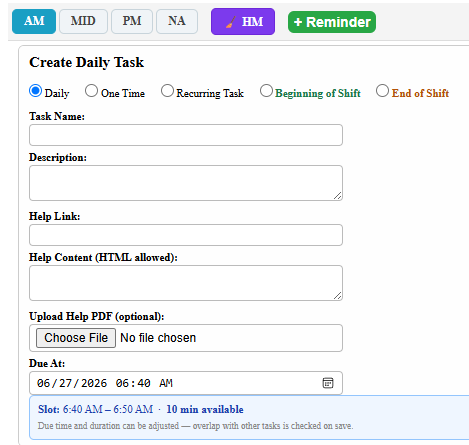
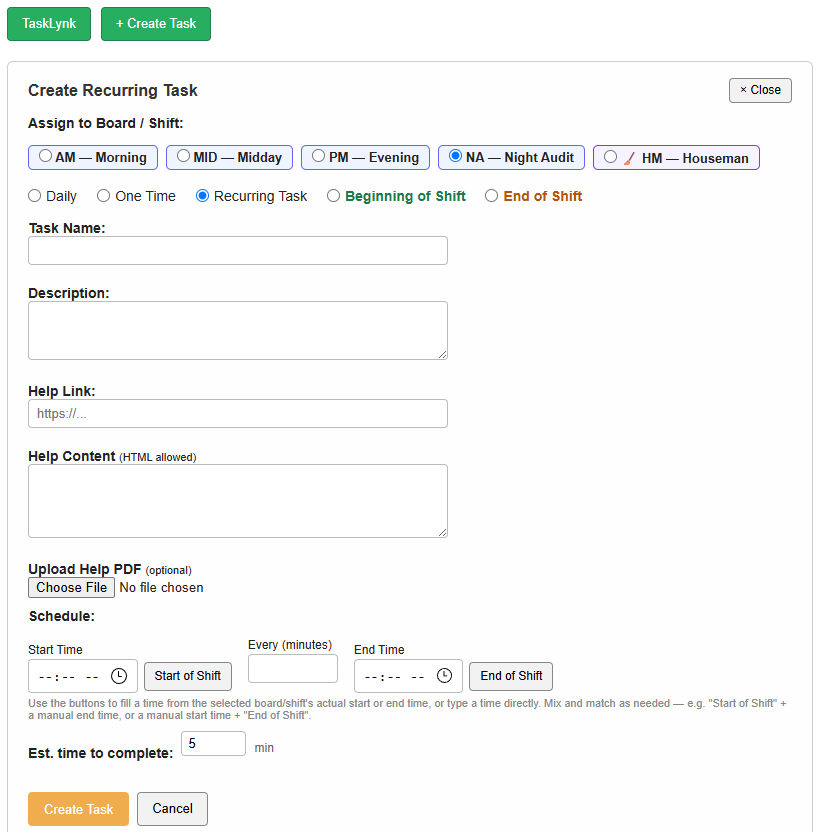
The primary way to set tasks. Pick the board/shift, choose from all five task types, and set the schedule — start time, interval, end time, or anchor it to the start or end of shift. Built for setting up the standing task list, not just one-off entries.

🗓️

Day Schedule Screen Manager & Admin

Add a task right from the day's board — pick a type, give it a name, and set a due date and time. The task lands directly in the open slot you're looking at, no need to jump to a separate screen.

⏱️

Insert Into a Time Gap Manager & Admin

The Tasks column shows the open time between consecutive tasks. Click + Add Task Here and the form pre-fills with a due time that fits the gap — no math, no manual entry.

🔔

+ Reminder Button All Staff

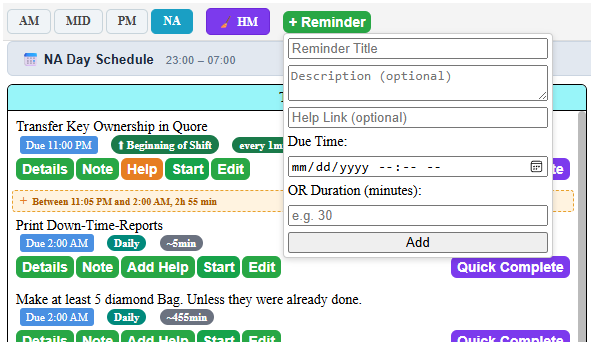
The only task creation available to regular users. A quick slide-down form right in the Tasks column for immediate guest commitments — towels, wake-up calls, parking validation, follow-ups. No due date required; set one or give a duration instead.

Task Types
Daily

Foundational tasks that appear every shift. Reset returns them to the Tasks column — they never leave the board permanently.
Manager & Admin
One Time

Date and time specific. Visible only on its scheduled day and cleared automatically after the next shift reset.

Manager & Admin
Reminder

Quick ad-hoc task for in-shift guest needs. Any staff member can create one in moments from the Reminder button.

All Staff
Recurring

Fires on a set interval within a defined start-to-end window, then retires automatically when the window closes.

Manager & Admin
Beginning of Shift

Auto-anchored to the shift start time. When shift times change, every BOS task's due time updates instantly — cash counts, key handoffs, Shift Status — Open reviews.

Manager & Admin
End of Shift

Due 15 minutes before the shift ends. Syncs automatically when shift end times change — drawer balance, report transmission, key handoff to incoming agent.

Manager & Admin
ShiftLynk Manage Tasks screen — creating a recurring task with board, type, and schedule fields
Manage Tasks — the main way to set tasks
Creating a daily task directly from the Day Schedule screen
From the Day Schedule screen
Inserting a task into an open time gap in the Tasks column
Into a gap in the Tasks column
Quick Reminder form in the Tasks column — the only task creation available to regular users
+ Reminder — the only path open to all users
Shift Transitions

The Handoff That Handles Itself

Every shift change in hospitality follows the same critical checklist: count the cash, verify every key, transmit the report, and pass the baton cleanly to the incoming agent. ShiftLynk automates the structure of that handoff — anchoring the right tasks to exactly the right times so your team always knows what to do, and managers never have to wonder if the transition was handled correctly.

🟢

Beginning of Shift (BOS) — Anchored to Shift Start

BOS tasks appear at the very top of the board and are due at the moment the shift begins. Count the cash, verify key ownership, review the Shift Status — Open notes — all waiting the second the shift opens. When a manager updates the shift start time, every BOS task's due time syncs automatically. No manual editing, no mismatched clock-in times.

🟠

End of Shift (EOS) — 15 Minutes Before the Bell

EOS tasks surface 15 minutes before the shift ends — not at the buzzer, but before it. That gives your agent time to balance the drawer, transmit the shift report, and complete the key handoff with room to breathe. Change the shift end time and every EOS task adjusts its due time automatically, keeping the 15-minute lead intact.

🔑

Cash, Keys & Reports — Nothing Slips Through

The most common audit failures at shift change come from rushed handoffs: an unlogged key, a drawer that was never balanced, a report that wasn't transmitted. BOS and EOS tasks turn those critical moments into a visible, clickable checklist — each completion timestamped and automatically recorded to the shift history. Accountability without paperwork.

😌

The Relief of a Clean Shift Close

For seasoned front desk agents, the EOS checklist is a quiet confidence at the end of a long shift — every item accounted for, every key logged, every report sent. The board confirms it before you clock out. For newer associates, it's the guardrail that makes sure nothing was missed. Either way, the shift ends clean and the handoff is done right.

⚡ Live Automation — Times Sync When Shift Times Change
Shift Start 6:00 AM 6:30 AM All BOS task due times updated
Shift End 3:00 PM 2:30 PM EOS tasks auto-moved to 2:15 PM

Update shift times once through the Start Shift form — every BOS and EOS foundational task on the board syncs immediately. No tracking down individual task records. No stale due times the morning after a schedule change.

shiftlynk.net/shift_board.php · AM Shift
S
ShiftLynk
AM Shift — Sun May 31 jdoe · Front Desk
🕐 6:30 AM – 3:00 PM BOS Due: 6:30 AM EOS Due: 2:45 PM ✓ Times synced
Beginning of Shift
Due 6:30 AM BOS
Count & Verify Cash Drawer
Reconcile with prior shift closing total
Due 6:30 AM BOS
Verify Key Log — Confirm All Keys Received
Due 6:30 AM BOS
Review SS Open Notes & Welcome Page
· · · regular shift tasks · · ·
End of Shift — 15 Min Before Close
Due 2:45 PM EOS
Balance Drawer & Transmit Shift Report
Due 2:45 PM EOS
Key Handoff to Incoming Agent
Due 2:45 PM EOS
Submit Shift Status — Close
Welcome Page

The First Read Every Shift — Before Anything Else

The Welcome page is the first screen every associate sees when they log in. Managers post shift-critical information here — VIP arrivals, policy updates, event holds, and cross-shift handoff notes — and the board reinforces it as a daily task so nothing gets missed during a busy shift change.

📣

Manager-Posted Shift Briefings

VIP arrivals, event holds, policy changes, and handoff notes — posted by leadership, visible to every associate the moment they log in.

🔔

Auto-Alert on Every Update

When the Welcome page is updated, ShiftLynk automatically creates a notification task on the active shift board — so no update goes unread, even on the busiest shift.

🏨

Property-Isolated by Design

Each property manages its own Welcome page independently. Associates only see content relevant to their location — no cross-property noise.

ShiftLynk Welcome page — shift briefings and manager announcements
New in v3.8

The Houseman Board & a Visual Day Schedule for Every Shift

Version 3.8 introduces a dedicated board for Houseman staff and a color-coded Day Schedule that plots every recurring and timed task across the shift — so anyone can see exactly when the day is busy, where the open windows are, and drop a new task into a gap with one click.

🧹

A Board Built for Houseman

Its own shift session, its own task set, and a defer-to-tomorrow workflow instead of cross-shift deferral. Tasks can't be scheduled at overlapping times — the board enforces clean, gap-aware scheduling automatically.

📅

Day Schedule — On Every Shift

AM, MID, PM, NA, and Houseman each get a Day Schedule panel: a visual timeline of the whole shift with recurring and timed tasks plotted as color blocks and free windows clearly labeled with their available minutes.

⏱️

Estimated Time Drives the Math

Every task carries an estimated completion time. The schedule uses it to calculate true gap sizes, flag overlaps before they happen, and show staff how much of the shift each block actually consumes.

Click a Gap, Fill It Instantly

Click any free window — on the schedule or between tasks on the board — and Create Task opens pre-filled with that slot's start time and available duration. No math, no manual entry, no idle time slipping by unplanned.

📅 Houseman Day Schedule 9:00 AM – 5:00 PM
9 AM 11 AM 1 PM 3 PM 5 PM
9:00 – 9:30 AM 🔴 Lobby & common area trash 30m
9:30 – 10:30 AM 🟢 Free — 60m available + Add Task
10:30 – 11:00 AM 🔴 Walk halls — collect linen 30m
11:00 – 12:00 PM 🟢 Free — 60m available + Add Task
12:00 – 12:30 PM 🔴 Walk halls — collect linen 30m
Management Visibility

See the Whole Shift — and Step In When It Matters

Every task on a ShiftLynk board exists in one of three clearly visible states: to-do, in progress, or complete. At any moment, a manager can open the board and see exactly where the shift stands — what's been finished, what's been acknowledged and started, and what hasn't been touched yet. No radio call required. No guessing.

The Quick Complete button is the key to making that middle state meaningful. Hospitality is unpredictable. An associate starts the conference room setup, gets pulled to the front desk for a check-in rush, and doesn't finish for another 20 minutes. Without Quick Complete, that task sits as "to-do" — invisible progress that creates unnecessary concern. With Quick Complete, the associate marks the task started the moment they begin, even if they can't finish it right then. The board reflects reality: something is in motion, someone owns it, and it's being handled.

For managers, that distinction is everything. A board full of to-do tasks looks very different from a board where half those tasks are already in progress. ShiftLynk makes that difference visible in real time — so managers can focus their attention exactly where it's needed and redistribute work before a deadline becomes a problem, not after.

👁️

Real-Time Board Visibility — No Login Required for Managers

The shift board reflects the live state of every task. Managers can check in from any device at any time — the board tells the story of the shift at a glance. Color-coded states and time-stamped badges make the picture immediate and unambiguous.

Quick Complete — Flexibility Without Losing Accountability

When an associate gets pulled mid-task, Quick Complete lets them immediately record the start without waiting until the work is fully done. The task moves to completed with a matching start and finish timestamp — capturing that the work was begun and acknowledged, even in a busy moment.

🤝

Redistribute Duties Before Deadlines Slip

When a manager sees a task that is overdue and still sitting in to-do — with the associate visibly occupied — they can reassign, defer, or personally complete that task before it becomes a guest-facing problem. The board gives leadership the situational awareness to act, not react.

🏆

Recognize Performance — Not Just Problems

The same visibility that surfaces what's falling behind also highlights what's ahead of schedule. Managers can recognize associates completing tasks early, identify who stepped up during a rush, and build the kind of positive accountability that motivates rather than micromanages.

📋

Started Timestamps in Every Shift Report

When a shift report is generated, tasks show both their start and completion times. For any task completed via Quick Complete, both timestamps are the same — and that's intentional context. Managers reviewing the report can see exactly when work began across the shift, not just when it ended.

AM Shift Board — Live View 9:42 AM
Tasks
Due 9:00 AM Daily
Lobby Restroom Check
Details Note Start Quick Complete
Due 9:30 AM Daily Started 9:28 AM
Conference Room Water & Coffee Setup
Details Note Complete Quick Complete
Due 10:00 AM Recurring
Coffee Station Check
Details Note Start Quick Complete
Complete
Done 7:04 AM Daily
Read Welcome Page & Review Arrivals
Done 9:12 AM Started 9:12 AM Daily
Verify Key Log & Confirm All Keys Received
Quick Complete — acknowledged during check-in rush
Overdue — needs attention
In Progress — started
Complete
Quick Complete
🎯

For the Property

Tasks get completed. Guests are served. The shift closes clean — because management always knows where to focus and can step in at exactly the right moment.

🤝

For the Associate

Quick Complete means work in motion is visible, not invisible. Associates aren't penalized for being pulled away — their effort shows on the board, and management can back them up instead of questioning them.

📊

For the Manager

Real-time visibility without micromanagement. A glance at the board tells the whole story — who's doing what, what's behind, and where one well-placed assist makes the difference between a good shift and a great one.

Featured Module

InfoLynk — Your Team's Living Communication Thread

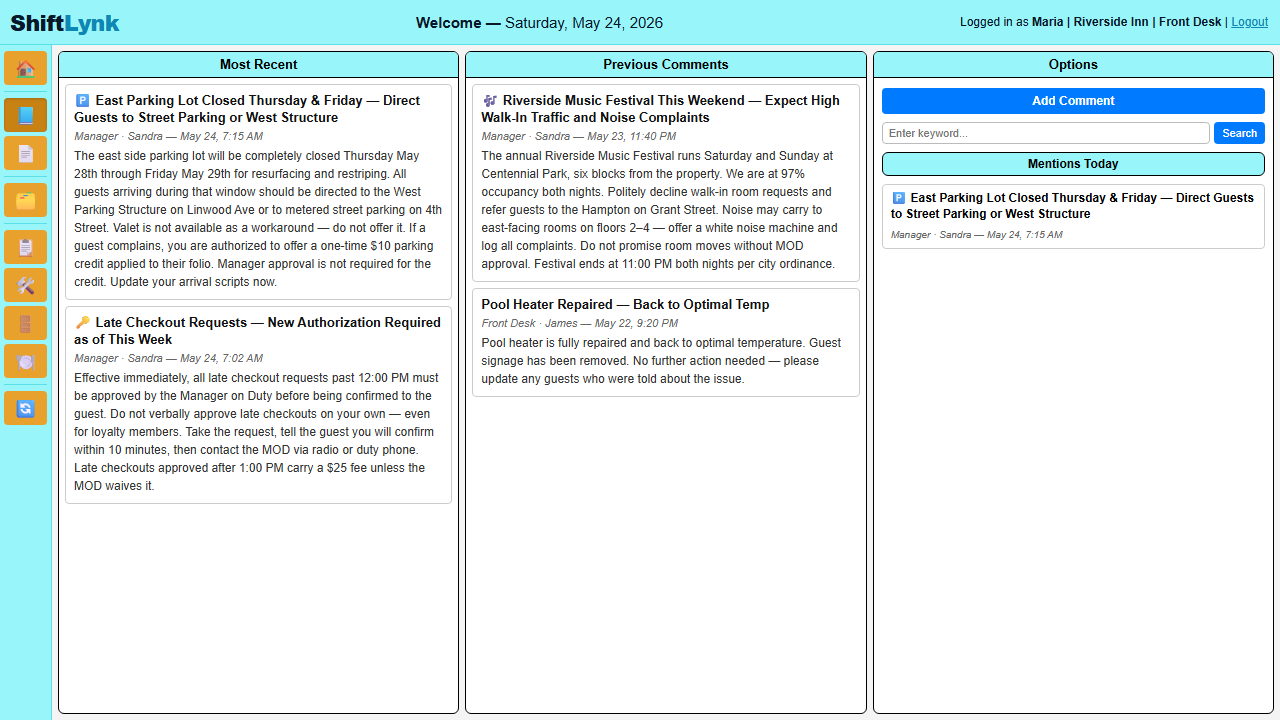
InfoLynk is the dynamic communication layer built into ShiftLynk. Every entry is automatically tagged with the logged-in user's name — no manual attribution. Property isolation ensures staff only ever see notes belonging to their assigned location.

👁️

4 Most Recent Notes Always Visible

The moment you log in, the four latest team notes are front and center — you're caught up before you take your first guest call.

📅

Intelligent Date Search

InfoLynk automatically surfaces any past note containing today's date — ideal for recurring daily tasks and shift-to-shift handoffs that reference specific dates.

🔍

Keyword Search & Scrollable Archive

Search any word or phrase to locate a specific note instantly. The full archive is always a scroll away — nothing is ever lost or overwritten.

🔒

Property-Isolated & Auto-Tagged

Every post, search, and deletion is scoped to the active property. Comments are automatically attributed to the session user — no impersonation, no misattribution.

↩️

Threaded Replies

Any team member can reply directly to a comment. Replies thread under their parent with a blue border, author name, and timestamp — keeping every conversation intact and easy to follow.

📖

Live TaskLynk Integration

When a comment or reply is posted, an InfoLynk task automatically appears in the active shift on the task board — so the desk team stays informed in real time without ever leaving their screen.

📅

Date-Aware Tasks — Notes Become Future Action Items

Any InfoLynk note that mentions a specific date — written today, last week, or last month — automatically creates a task on all four shift boards on that exact date. A note that says "VIP arrival June 14, champagne on arrival" needs no follow-up. On June 14, every shift sees it at the top of their board with the full comment and every reply included in the Details panel. The task is refreshed on every page load, so replies added later in the day are always current.

This is something a paper task list can never do — a commitment written once, honored automatically on exactly the right day, on every shift.
ShiftLynk InfoLynk — team communication board showing manager posts, date matching, and options panel
RoomsLynk

Room Tracking, Pets & Guest Requests — All in One View

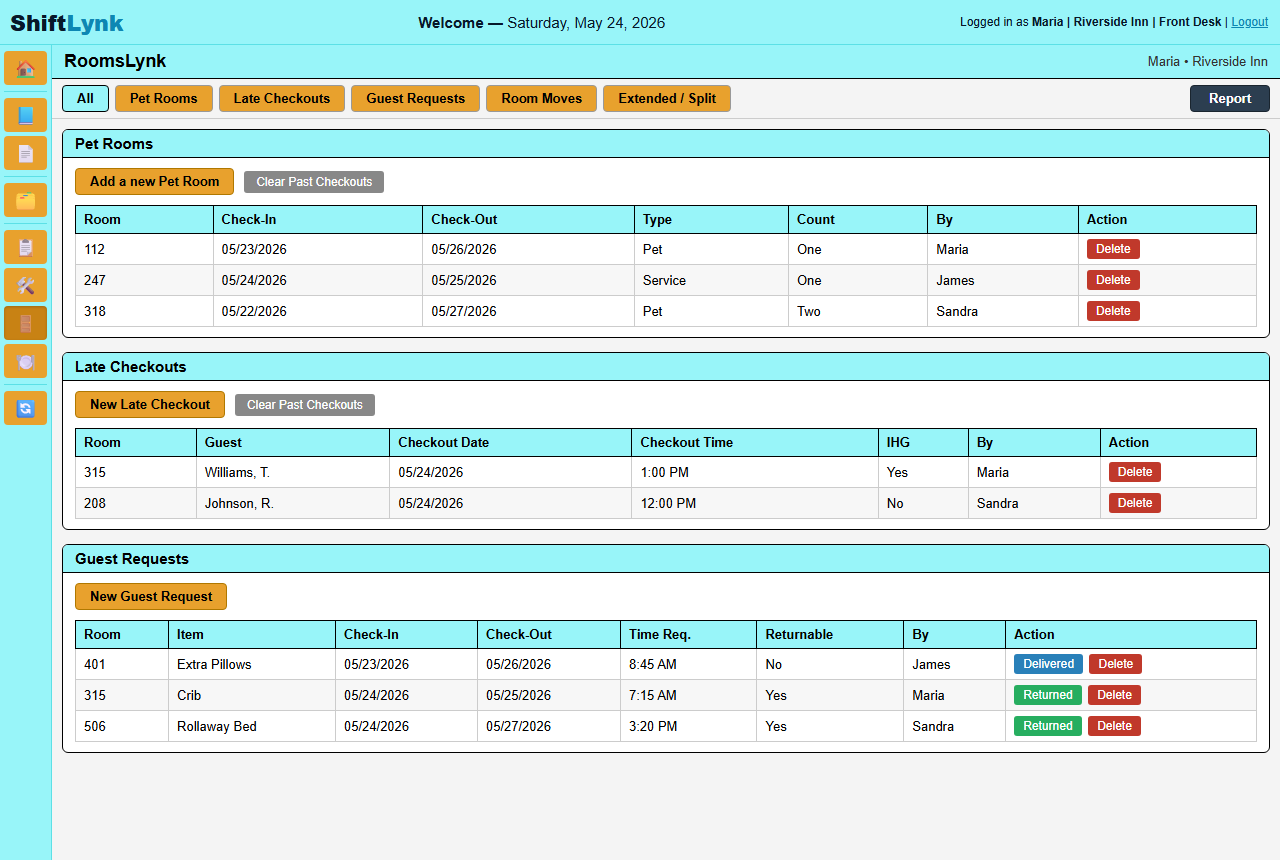
RoomsLynk gives your front desk a live, shift-by-shift view of every room's status — clean, dirty, occupied, or flagged. Pet accommodations, guest special requests, and room notes are logged directly to the room record so nothing slips through a handoff.

🚪

Live Room Status Board

Every room displays its current housekeeping status at a glance — updated by staff in real time so front desk always knows what's ready for a guest.

🐾

Pet & Special Request Tracking

Flag pet-occupied rooms and log guest-specific accommodations directly on the room record — visible across shifts so every team member stays informed.

📝

Per-Room Notes & History

Attach shift notes to any room — maintenance issues, VIP preferences, pending requests — with full timestamped history for accountability and context.

🏨

Property-Scoped & Shift-Aware

Room data is fully isolated to each property and visible across all four shifts — so every team member starts their shift with accurate, current room intelligence.

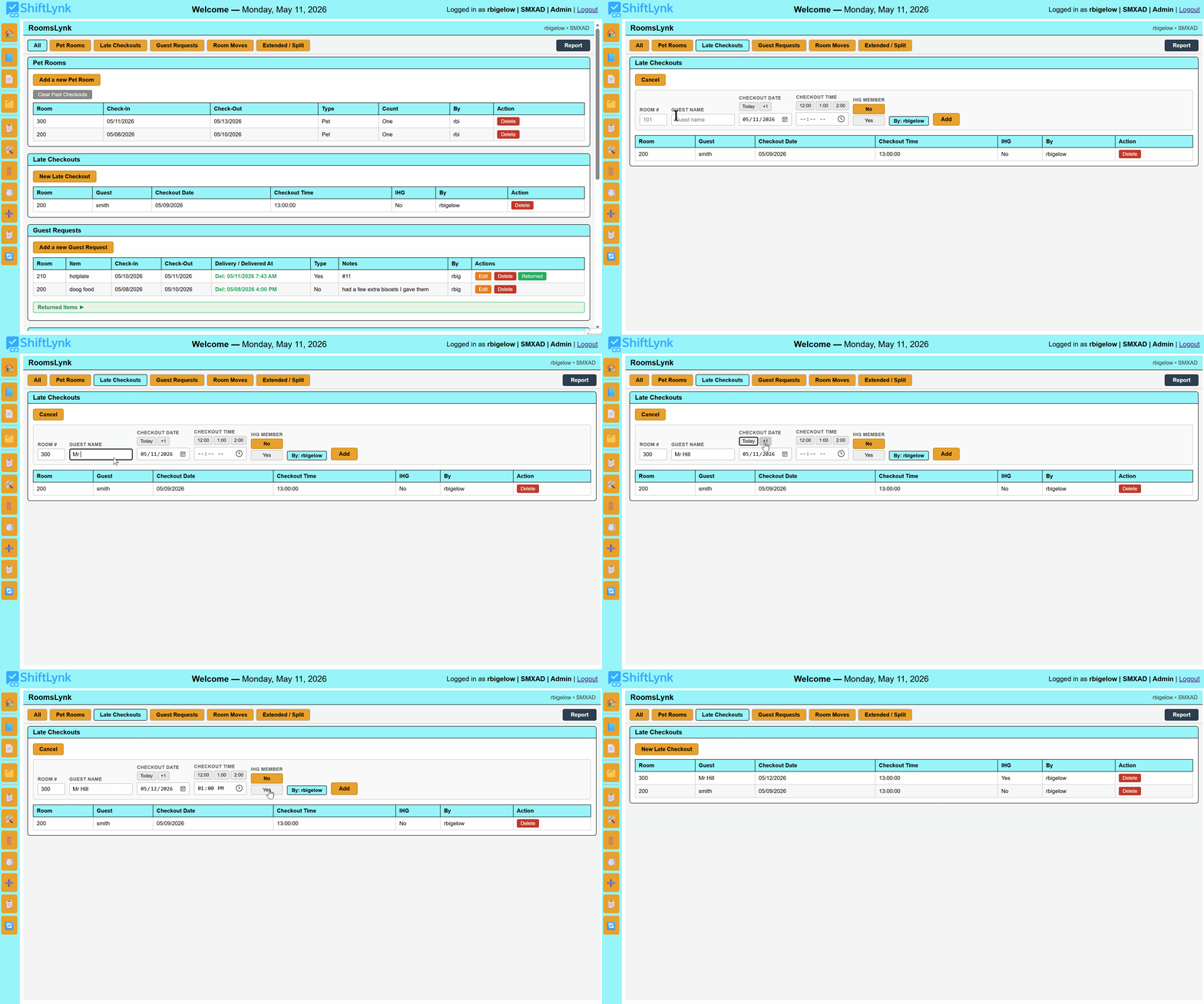
ShiftLynk RoomsLynk — pet rooms, late checkouts, and guest requests board
See It in Action

Every Guest Detail. Every Room. Every Shift.

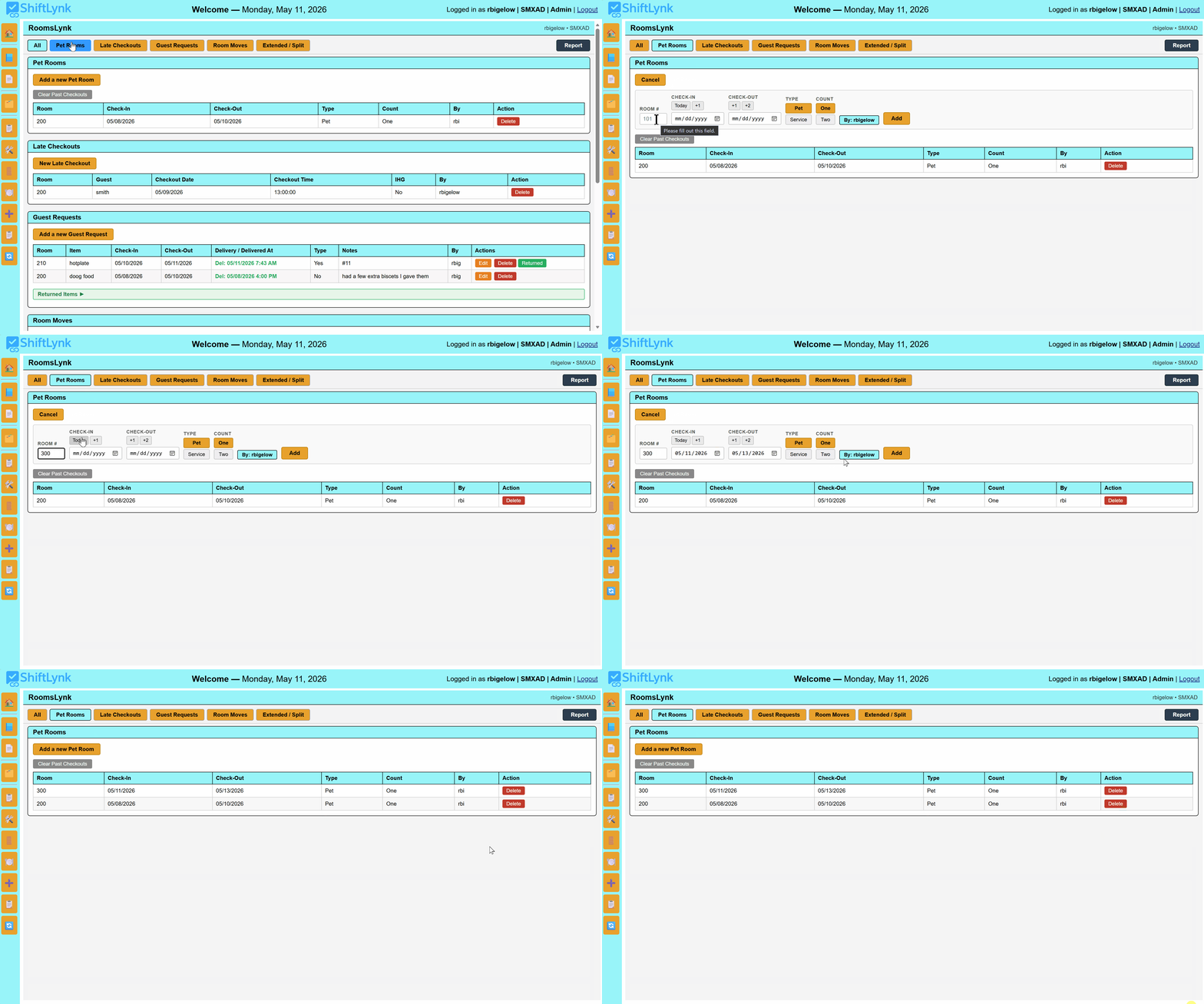
Watch how front desk associates log the details that matter — pets, late checkouts, special requests, and room moves — directly on the room record so every shift inherits accurate, complete information.

RoomsLynk — flagging a room as pet occupied
🐾

Flagging a Pet Room

Mark a room as pet-occupied in seconds. The pet flag appears on the room record immediately — visible to every shift so housekeeping and front desk always know before they knock on that door.

RoomsLynk — adding a late checkout to a room
🕐

Logging a Late Checkout

Approved a late checkout? Log it directly on the room record with the agreed time. Housekeeping sees it before they schedule the room — no more phone tag, no more confused associates, no more inconvenienced guests.

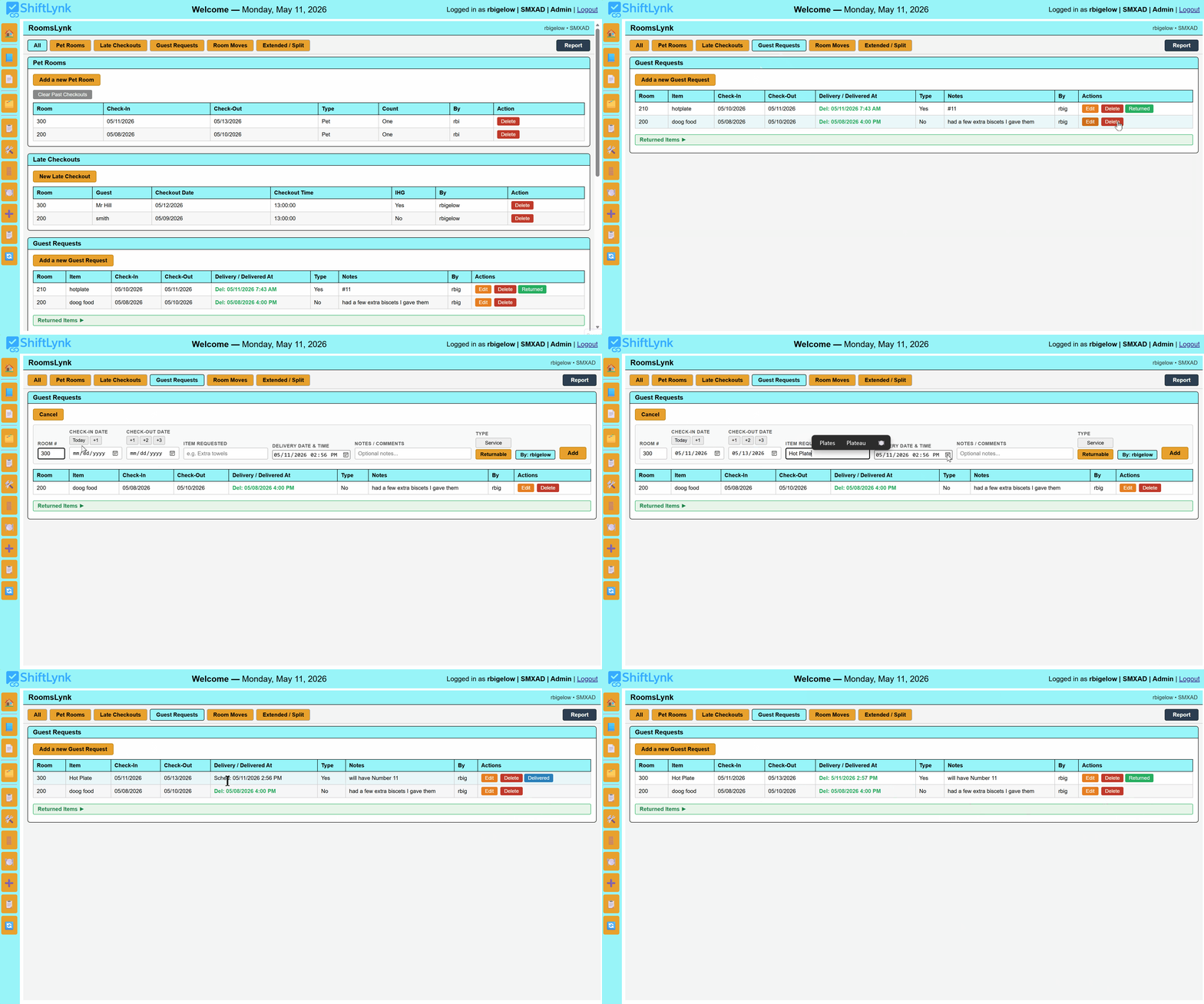
RoomsLynk — logging a guest special request

Recording a Guest Request

Extra pillows, a rollaway bed, an allergy note — log any special request directly on the room. Every associate who opens that room record on any shift sees the request without anyone having to repeat themselves.

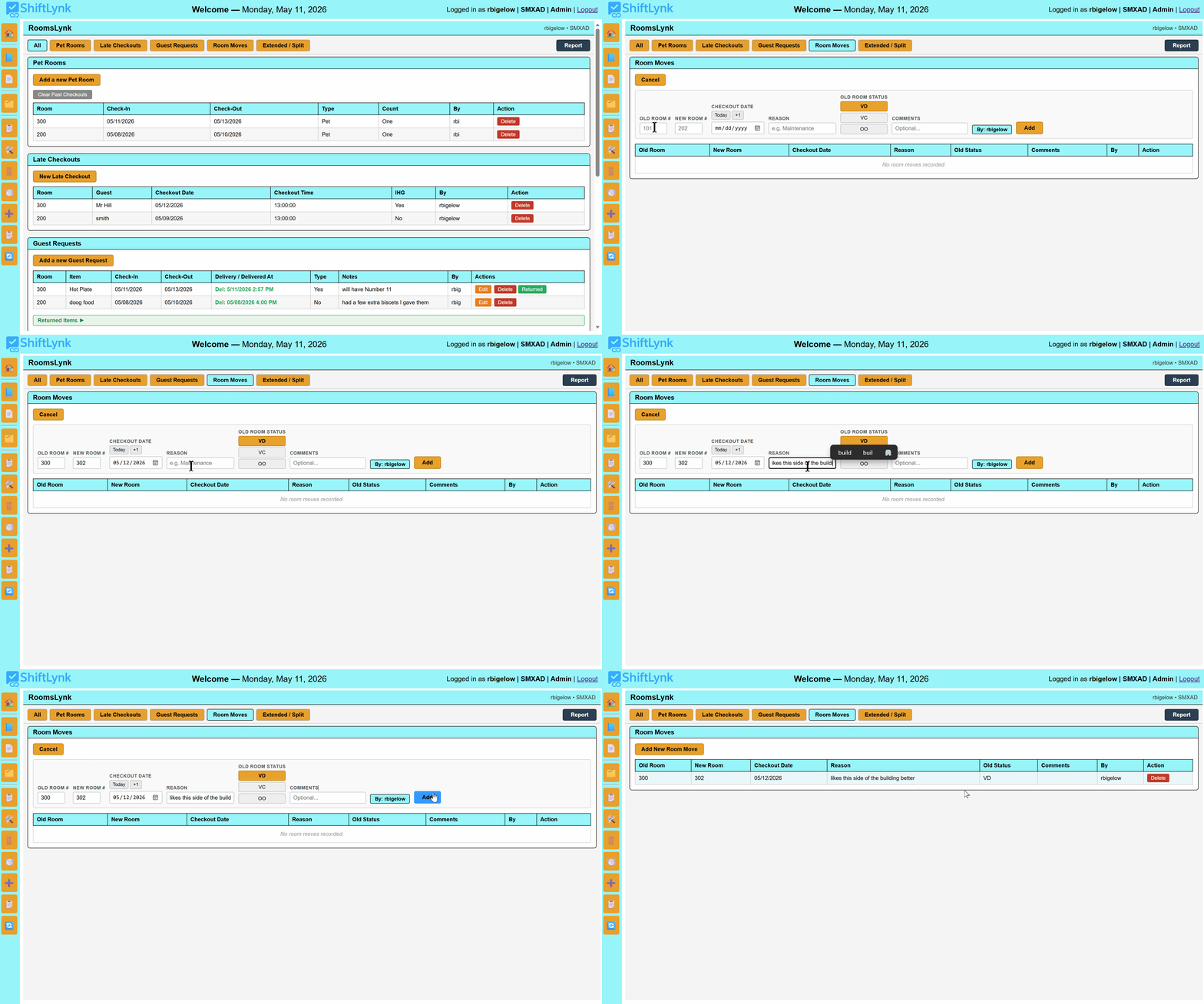
RoomsLynk — moving a guest to a different room
🔄

Moving a Guest to a New Room

Maintenance issue, guest preference, or an upgrade — room moves happen. RoomsLynk lets you reassign the room record so the new room carries the guest's details and the vacated room is flagged for housekeeping. Nothing falls through the handoff.

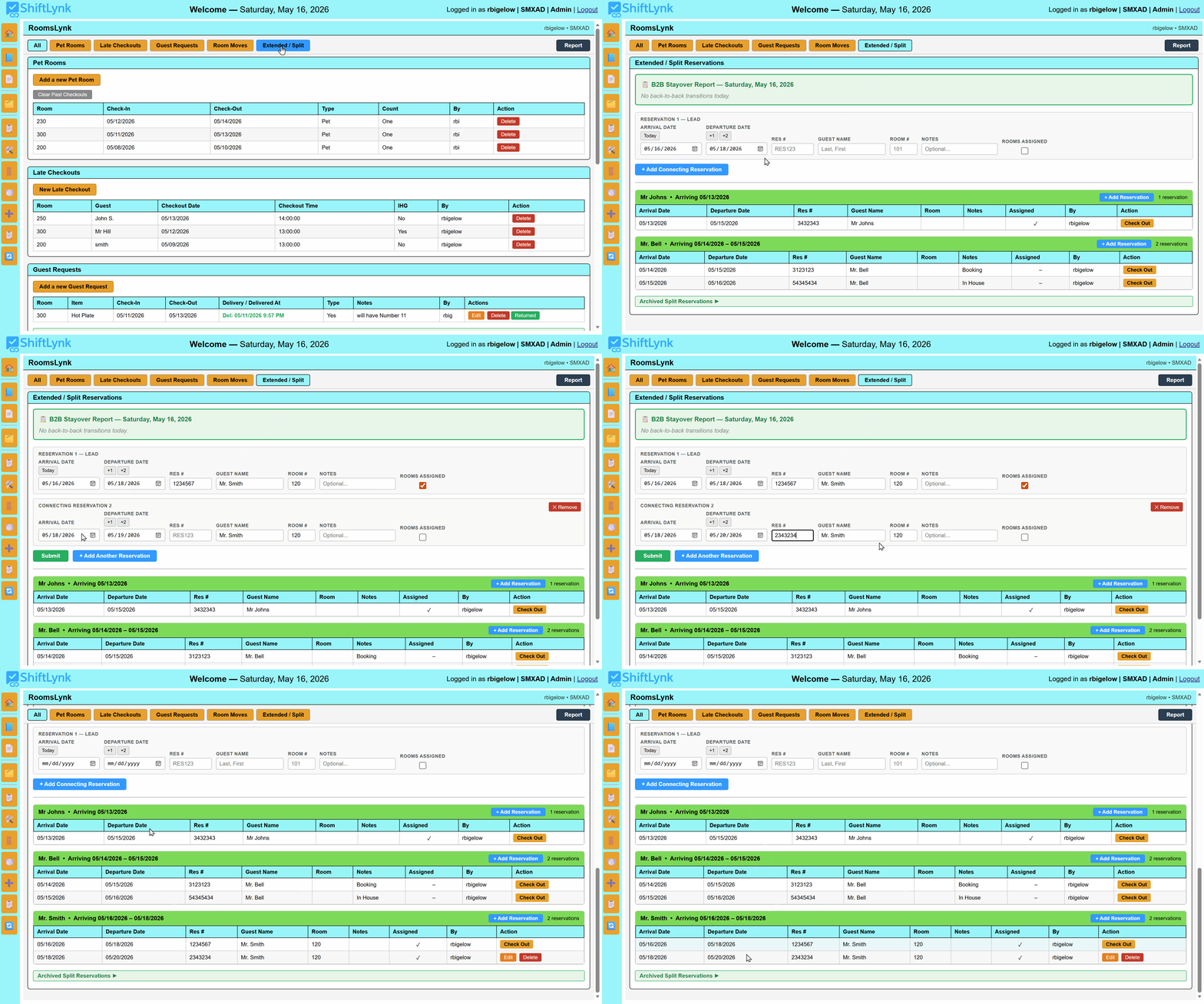
RoomsLynk — linking a back-to-back stayover reservation
🔗

Linking a Back-to-Back Reservation

When a guest books through one channel and extends through another, the result is two separate reservations under the same name — and housekeeping flagging the room for departure when the guest isn't going anywhere. RoomsLynk lets front desk link those reservations so the room is marked as a stayover, not a Do-Out. No missed connections. No displaced guest. No housekeeping confusion.

Integrated Help System

SOPs and Training — Right Where the Work Happens

ShiftLynk's slide-out Help Panel puts every SOP, procedure, and reference document one click away from any task on the board. When a question arises mid-shift, staff don't leave the platform — they click Help and the answer is right there.

Managers and Admins can update help content in real time with no page reload — HTML instructions, uploaded PDF guides, and external links can all be attached to any individual task.

📘

Rich HTML Help Content

Format step-by-step instructions, checklists, and policy notes directly in the platform — no separate document needed.

📄

PDF SOP Uploads

Attach your existing SOP documents, diagrams, or reference sheets to any task — viewable instantly without leaving the board.

🔗

External Links

Connect tasks to online resources, property manuals, or training videos — everything your team needs in one click.

🛠️

Role-Based Editing

Only Admins and Managers can modify help content — staff see the instructions, leadership controls what they say.

ShiftLynk Help System — task card with SOP panel open
Enterprise-Grade Security

Built Secure from the Ground Up

ShiftLynk v2.8 introduced a zero-data-bleed guarantee — every action is property-scoped, every credential is hashed, every operation is auditable.

🏨

Full Property Isolation

Every database write — tasks, notes, completions, defers, resets — includes a property constraint. Actions at one location are physically incapable of affecting another property on the same account.

👤

Role-Based Access

Admin, Manager, and Staff roles each have clearly defined permissions. New user creation is restricted to Admin sessions only — preventing unauthorized account creation across all properties.

🔐

Hashed Password Storage

All passwords are stored using industry-standard hashing algorithms. Credentials are non-reversible — even in the event of unauthorized access, passwords cannot be exposed.

📋

Complete Audit Trails

Every task completion, deferral, return, and note is logged with property, user, and timestamp. Shift reports capture the full operational record for coaching, compliance, and accountability.

Atomic Database Transactions

All delete and update operations are wrapped in MySQL transactions with automatic rollback on error — ensuring no partial writes ever corrupt your shift data.

🔄

Safe Reset Shift

Reset Shift now posts the active shift explicitly via a hidden form field — eliminating the race condition where the wrong shift could accidentally be cleared. A confirmation prompt prevents accidental resets.

🛡️

Server-Enforced Permissions

Creating, editing, and deleting foundational tasks is verified against the user's role on the server — not just hidden in the interface. Staff keep full use of reminders, notes, and completions, while the standing schedule stays manager-controlled even against direct requests.

🔏

CSRF-Protected Actions

Create, edit, and delete actions carry a per-session security token that is validated before any change is saved — so a malicious page can't trick a signed-in manager's browser into altering your schedule. Deletes are protected POST actions, not plain links.

🚫

Brute-Force Lockout & Hardened Sessions

Repeated failed logins lock the account for 15 minutes — and repeated failures from one network address block that address, stopping bots that cycle usernames. Session cookies are HttpOnly, HTTPS-only, and SameSite, and every login issues a brand-new session ID.

PantryLynk

Know What's in Stock Before You Walk to the Store Room

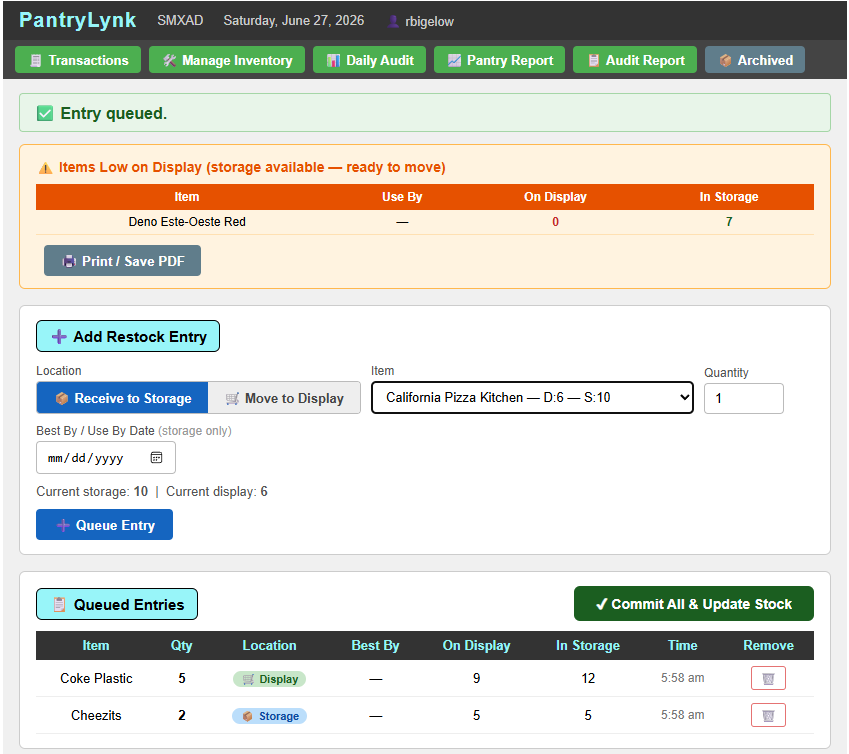
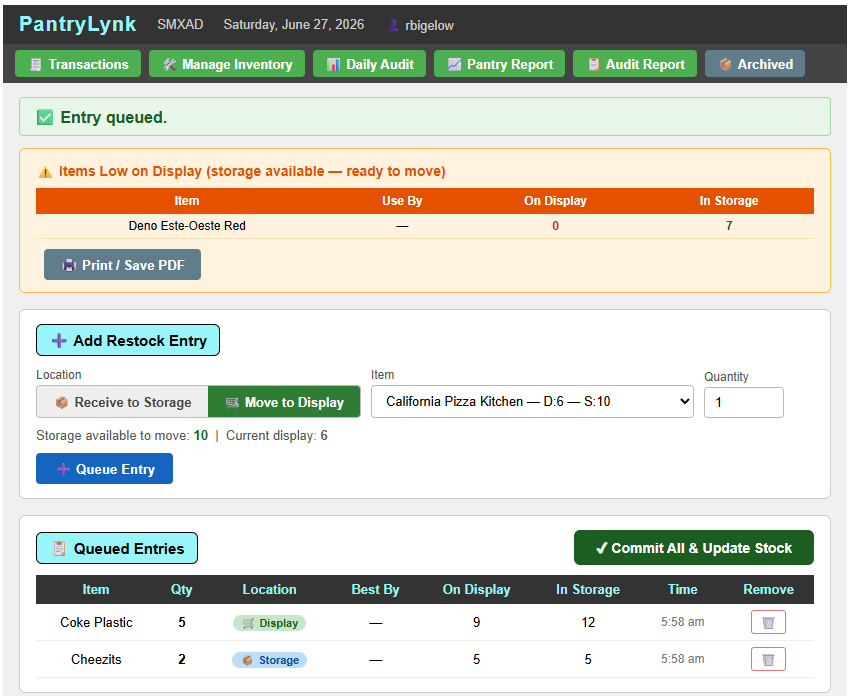
No separate system needed. PantryLynk tracks every item across two pools — Storage and Display — so staff can see what's actually on hand and build a guest quote before ever leaving the desk. Once an order arrives it's received into storage, then moved to display as space opens up — and stock can move back to storage just as easily if a display gets reset or overstocked.

Receive to Storage — log new stock the moment it arrives, with an optional best-by / use-by date, before it's ever touched on the floor.

Move to Display — pull from storage to the display in whatever quantity is needed; storage and display counts update together so neither number is ever stale.

Low-on-display alerts — when an item is running low on display but storage still has stock ready to move, PantryLynk flags it automatically.

Audit anyone, anytime — any staff member can run an audit on either storage or display counts whenever they want, not just on a schedule. Every audit records who sold what and exactly how it moved the supply.

Divergence detection & traceability — the audit report flags items where actual counts differ from expected quantities, with full timestamp and staff attribution on every entry.

Coming Next to PantryLynk

House consumables (toothbrushes, coffee pods, toilet paper, hand towels), property consumables (gloves, trash bags, cleaning supplies, linens), and a returnable-equipment count for items like pack-n-plays, cribs, hot plates, and BBQ tools.

PantryLynk — receiving new stock into storage with quantity and best-by date
Receive to Storage — log stock as it arrives
PantryLynk — moving stock from storage to display
Move to Display — restock the floor from storage
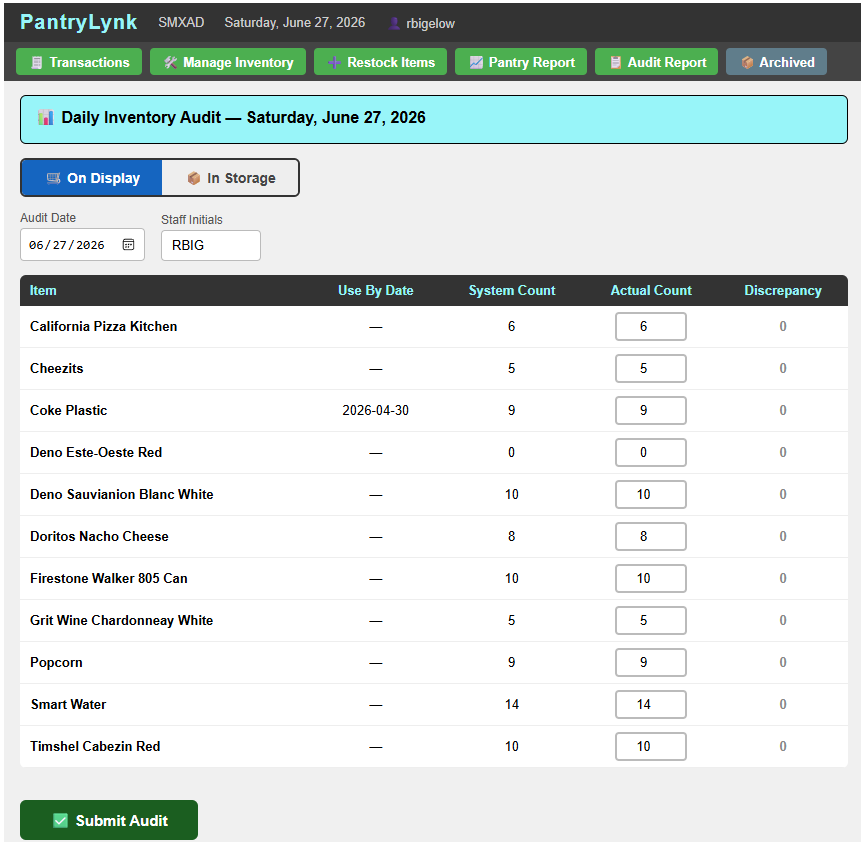
PantryLynk — Daily Inventory Audit toggled between On Display and In Storage counts
Daily Audit — toggle between On Display and In Storage
SupplyLynk NEW

Track What Gets Used — Not Just What Gets Sold

PantryLynk handles what you sell. SupplyLynk handles everything your team simply uses — the trash bags, gloves, toilet paper, coffee pods, and cleaning supplies that keep a property running. No prices, no sales — just an honest, always-current count of what's on hand, so a houseman knows what he has before he ever walks to the store room.

🧻

House & Property Consumables

Two clear buckets: house consumables the guest uses (toothbrushes, coffee pods, toilet paper, hand towels) and property consumables the team burns through (gloves, trash bags, cleaning supplies, linens). Each item is categorized so counts and reports stay organized.

📦

Boxes & Singles — Counted the Way You Store Them

Stock is tracked as full boxes + loose singles with a count-per-box, and the total is always computed for you. Open a box and the system breaks it into singles automatically — the math never drifts.

✏️

One-Tap Record Use

A fast, price-free screen where any staff member logs use in a tap — a single, a full box, or an exact quantity — with who and when captured automatically. Built for the reality that anyone can grab a trash bag whenever they need one.

📊

Optional Audits That Catch the Untracked

Count whenever the property wants a fresh number — no fixed schedule. Any negative difference is flagged as used without being recorded, which is normal for freely-grabbed supplies — so you see real consumption instead of chasing phantom loss.

Receive Stock & Par-Level Alerts

Log deliveries by box or single, and set a par level per item so SupplyLynk flags anything running low and ready to reorder. A full usage report breaks activity down by date, item, or category.

🧳

Returnables — Wired Into RoomsLynk

Cribs, pack-n-plays, hot plates, and BBQ tools are tracked as owned vs. out vs. available. Right in the RoomsLynk Guest Requests screen, staff see live availability and — the moment a returnable is promised to a room — the available count drops, then climbs back when it's returned. No double-booking the last crib.

AILynk NEW

Ask Your Property Anything — In Plain English

"How many Snickers were sold in the past week?"  "Which tasks were missed on PM shift?"  "Were all the hot plates returned last month?" — AILynk is a built-in AI assistant with its own tab that answers questions like these from your property's own live data, in seconds. No reports to open, no filters to set. It answers the way a sharp coworker would: "5 hot plates went out last month — 4 are back, 1 is still out in room 214." And because ShiftLynk now keeps a full year of shift-by-shift task history, AILynk can answer questions about the past that no report screen ever could — your property finally has a memory, and an assistant that can search it.

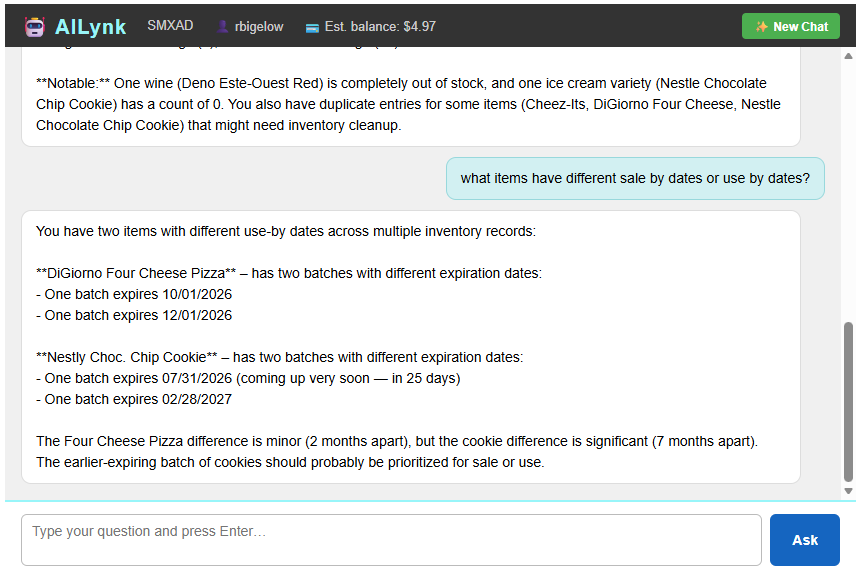
AILynk answering a plain-English question about which pantry items have different sale-by or use-by dates, flagging a batch of cookies expiring soon
A real question — "what items have different sale by dates or use by dates?" — answered from live inventory, with the soonest-expiring batch flagged automatically.
💬

Plain Questions, Real Answers

Type a question the way you'd say it out loud — item names don't even need to be spelled right. AILynk finds the data, does the math, states the date range it used, and keeps it to a sentence or two. Ask a follow-up like "what about last month?" and it knows exactly what you mean.

🔎

Sees Across All of ShiftLynk

One assistant, every module: a full year of task history (what was done, missed, and how long it really took); Shift Status (SOD/EOD) reports and drawer counts; InfoLynk posts and replies; RoomsLynk moves, late checkouts, and pet rooms; PantryLynk sales and stock; SupplyLynk usage; returnables and guest requests. Ask "summarize what happened yesterday" and it pulls from all of them at once.

💡

Tells You What You Didn't Ask

Answers include the things a good manager would mention: an item running low while you're asking about its sales, a returnable that never came back, a spike that looks unusual. The details that would take four reports to notice arrive in one reply.

🔒

Read-Only & Property-Scoped

AILynk can look, never touch — it's technically incapable of adding, changing, or deleting anything. Every lookup is locked to the logged-in property, and user accounts and passwords are walled off from the assistant entirely.

💳

Pennies Per Question — No Subscription

AILynk uses a professional AI service that bills only for what's asked: a typical question costs about 1–3 cents, and an unused AILynk costs nothing. A property connects its own AI account once — as little as $5 in credit typically lasts months of casual use.

📉

Cost You Can Watch

The AILynk header shows an estimated remaining credit balance that counts down with every question, and every question's usage is logged — who asked, from which property, and what it cost. No surprises at the end of the month.

Shift Reports & Accountability

Management Visibility — Every Shift, Every Day

ShiftLynk generates polished, complete shift reports that give leadership the operational picture they need — printed, emailed, or archived.

🖨️

Print-Ready PDF Reports

Generate a complete, well-formed summary of all shift activity — tasks completed, deferred, and returned — with timestamps and notes. Print or save directly from the browser.

⏱️

Variance Threshold Reporting

Set a time threshold before generating the report. An Early section and a Past Due section are appended automatically, listing only tasks that exceeded the threshold — sorted from smallest variance to largest. Default is 1 hour; Admins and Managers can adjust.

🗄️

Task History — Saved at Every Reset

The moment a shift is reset, every task is archived automatically — completed or missed, start and finish times, actual duration vs. estimate, who did it, and every note. A full year of shift-by-shift history is browsable on the History Data screen, searchable by AILynk, and exportable to a spreadsheet before anything ages out. No manual action, ever.

🌙

Night Audit Daily Activity Report

Every property chooses how it wants to close out the day: let each shift print and reset its own report individually, or roll everything into one Night Audit report that compiles every shift's activity into a single document. Either way, individual per-shift reports are still available on request — it's never one or the other. The compiled report merges tasks completed across shifts (so the same task done on AM and PM shows up once, with each shift and user credited), gathers every Shift Status — Open and Shift Status — Close submission with divergence figures, and adds an optional notes-only summary page. Staff get a simpler end of shift with one less thing to remember, since resetting a shift is off by default until a Manager or Admin turns it on; Managers and Admins get one consolidated, date-stamped record of the entire property's day, with a confirmation step before anything is cleared.

Who It's For

Built for the Teams That Make Guests Feel Welcome

ShiftLynk is purpose-built for the departments that interact most directly with guests — enhancing your existing tools without replacing them.

🛎️

Front Desk & Guest Services

Start every shift informed. Know which guests have special requests, celebrate outstanding reviews, create instant reminders for guest commitments, and access any SOP without leaving the board.

🛏️

Housekeeping

Digital room checklists replace paper logs. Post status changes and flag issues through InfoLynk — keeping all departments in sync with zero phone tag and no missed handoffs.

🛍️

Gift Shop & Retail

Track inventory levels, flag low-stock items, and run daily audit reports — all from the same platform your whole team already uses. Restocking, divergence detection, and history included.

📊

General Managers & Leadership

Gain full oversight without being in every conversation. Shift reports, InfoLynk logs, audit trails, and role-based permissions give you the visibility to coach staff and run a tighter operation.

Core Pillars

Seven Principles Behind ShiftLynk

The framework that drives better teams, better service, and better guest experiences — consistently, every shift.
01

Automated Communication

Updates reach every team member the moment they log in — no chasing, no repeating.

02

Streamlined Procedures

Digital checklists and SOPs make every task clear, trackable, and consistent.

03

Enhanced Team Collaboration

InfoLynk connects every department in real time — no silos, no missed handoffs.

04

Centralized Information

One login for everything — tasks, SOPs, updates, inventory, and team notes.

05

Interactive Tools

Searchable archives, date intelligence, live inventory, and printable reports — tools that actively work for your team.

06

Cost Reduction Focus

Zero paper, fewer errors, no miscommunications — ShiftLynk pays for itself fast.

07

Consistency Across Every Shift

Every employee follows the same procedures — every department, every shift — so guests experience the same exceptional service regardless of who is working that day.

Why ShiftLynk

Built for Your Front Desk — Not Adapted to It

ShiftLynk was created on the floor of a working hotel, by people who run shifts every day. Everything in it exists because a real property needed it — which is exactly why it fits the way your team already works.

🏨

Made for Independent Properties

Purpose-built for hotels, motels, and resorts that want their whole shift in one place — without enterprise complexity, long onboarding, or features you'll never use.

🔑

One Login, the Whole Shift

Tasks, team communication, room status, and inventory all live under a single login — so your team opens one page at clock-in and has everything they need to serve guests confidently.

⏱️

Anchored to the Shift Itself

Beginning- and end-of-shift tasks time themselves, the day schedule shows exactly what's coming, and the Night Audit report closes out the day automatically. It works the way a shift actually runs.

💵

Honest, Flat Pricing

One simple price per property. Unlimited team members, every module included, all future updates — no per-user fees, no per-room math, no surprises.

🌐

Nothing to Install

Fully browser-based. Any device with a web browser is ready to go — no downloads, no hardware, no IT project to get started.

📈

Grows With Your Team

New modules and features arrive regularly and are included at no extra cost — the platform keeps getting more capable while your price stays simple.

Pricing

Simple, Honest Pricing

ShiftLynk has been developed and refined in active hotel environments for years. We're now opening the platform to additional properties — and we want to make that first step as easy as possible.

★  Introductory Offer — Pricing is subject to change as the platform continues to grow

Monthly
$79
per property  /  per month
  • Full TaskLynk shift board
  • InfoLynk team communications
  • RoomsLynk housekeeping board
  • Shift reports & PDF export
  • Shift Status reporting
  • Unlimited team members
  • All future updates included
Start Free 30-Day Trial
BEST VALUE
Annual
$69
per property  /  per month
Billed $828/yr — save $120
  • Everything in Monthly
  • Priority support
  • Early access to new features
  • Lock in your introductory rate for a full year
Start Free 30-Day Trial

Both plans begin with a full 30-day free trial — no credit card required.
At the end of your trial, simply choose the plan that works best for your property.

Managing multiple properties?  Contact us  for multi-property pricing.

✦  This is an introductory offer. Rates are subject to change as new features are added and the platform grows. Existing subscribers will always receive advance notice before any pricing changes take effect. Billing and payment details will be provided upon completion of your free trial.

Release History

Always Getting Better

ShiftLynk ships real improvements continuously — driven by what working properties ask for. Here's the release trail; click through for the full notes on any version.

v 3.16July 15, 2026 Submit Report & Reset, Inline Returns & Security HardeningLatest
v 3.15July 7, 2026 Task History, the History Data Screen & a Smarter AILynk
v 3.14July 6, 2026 AILynk — Ask Your Property Anything, In Plain English
v 3.13July 5, 2026 PDF Reports, Use-By Date Tracking & a Redesigned Record Use
v 3.12June 30, 2026 SupplyLynk, PantryLynk Categories & Day Schedule Accuracy
v 3.11June 27, 2026 Security Hardening, Multi-Shift BOS/EOS Tasks & Role-Based Guides
v 3.10June 22, 2026 Reset Shift Permissions & the Night Audit Daily Activity Report
v 3.9June 5, 2026 Start/Complete Task Timing & Live Progress Colors
Show earlier releasesHide earlier releases
v 3.8June 4, 2026 Houseman Board, Visual Day Schedule & Gap-Aware Scheduling
v 3.7June 1, 2026 Date-Aware InfoLynk Tasks, BOS/EOS Pinned Tasks & Shift Status Reporting
v 3.6May 25, 2026 InfoLynk Reply Threading, Live Task Integration & Full-Thread Search
v 3.5May 24, 2026 Smart Task Placement, Recurring Cadence Fix & PDF-Confirmed Reset
v 3.4May 23, 2026 Inline Task Creation, Task Type Badges & Content Change Notifications
v 3.3May 18, 2026 TaskLynk Board Redesign
v 3.2May 11, 2026 TaskLynk Improvements & Report Enhancements
v 3.1May 9, 2026 PasteLynk & RoomsLynk Onboarding Screens
v 3.0May 4, 2026 Recurring Time Windows, SOD/EOD Reporting & Inline Task Editing
v 2.9May 2, 2026 One-Time Tasks & Help Button Improvements
v 2.8April 2026 PantryLynk — Full Pantry Management Suite
v 2.7April 2026 RoomsLynk — Property-Aware Rooms Management
v 2.6February 22, 2026 Task Flow & UI Refinements

ShiftLynk v3.16 — Released July 15, 2026 · Submit Report & Reset, Inline Returns & Security Hardening: The end-of-shift button is now Submit Report & Reset — and it stays greyed out until every task on the board is completed, so the shift report always reflects finished work (recurring tasks never block it). RoomsLynk returns now confirm right on the row — the form drops in beneath the request you clicked instead of jumping the page. Platform-wide security hardening: login lockout after repeated failed attempts (per account and per network address), hardened HttpOnly/HTTPS-only session cookies with fresh session IDs at every login, and per-session CSRF tokens validated on every administrative action. Platform administration gained full property lifecycle control — create properties directly, and completely remove a departing property's data in one verified, all-or-nothing operation. · Previous release (v3.15, July 7, 2026): Task History, the History Data Screen & a Smarter AILynk.

Experience the Platform Yourself

Explore ShiftLynk at our live demo site. Request the access password and see the full platform in action — no commitment, no credit card required.

Request Your Access & Password →